
Hyundai Ioniq (AE): Front Door / Front Door Trim. Repair procedures
Hyundai Ioniq (AE) 2017-2022 Service & Repair Manual / Body (Interior and Exterior) / Front Door / Front Door Trim. Repair procedures
| Replacement |
|

|

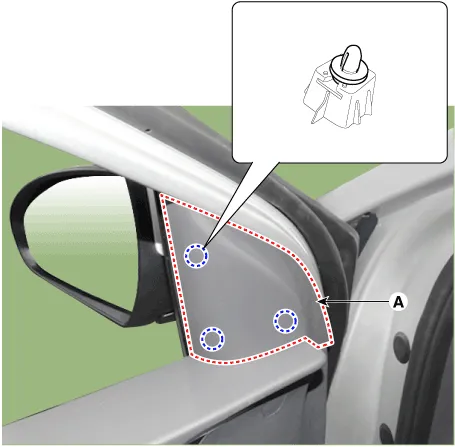
| 1. | Using a screwdriver or remover, remove the front door quadrant inner cover (A).
|
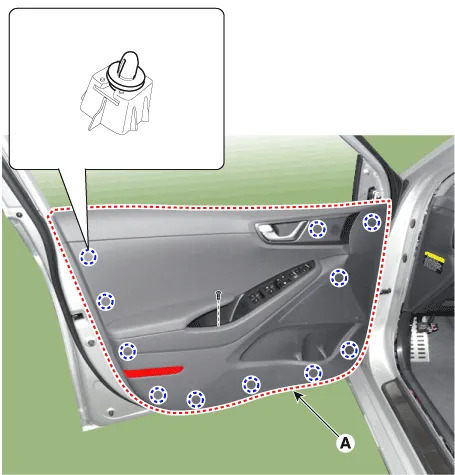
| 2. | After loosening the mounting screws, remove the lower part of the front door trim (A) using a flat-tip screwdriver.
|
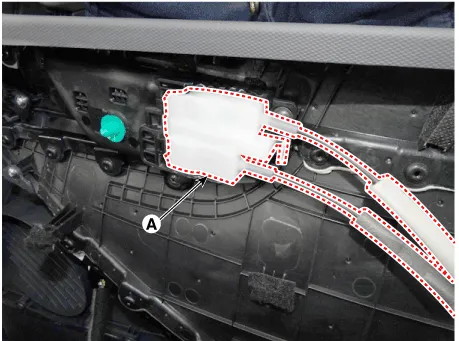
| 3. | Remove the front door inside handle cage (A).
|
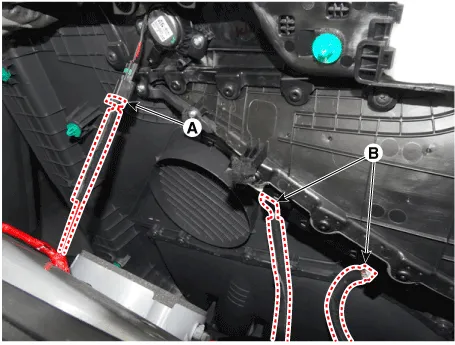
| 4. | Disconnect the front door lamp connector (A) and power window switch connector (B).
|
| 5. | To install, reverse the removal procedure.
|

Component Location 1. Front door trim
Replacement1.Remove the front door trim.(Refer to Front Door - "Front Door Trim")2.After loosening the mounting screws, remove the front door inside handle (A).
Other information:
Hyundai Ioniq (AE) 2017-2022 Service & Repair Manual: In-car Sensor. Description and operation
DescriptionThe In-car air temperature sensor is built in the heater & A/C control unit.The sensor contains a thermistor which measures the temperature of the inside. The signal decided by the resistance value which changes in accordance with perceived inside temperature, is delivered to heater control unit and according to this signal the contr
Hyundai Ioniq (AE) 2017-2022 Service & Repair Manual: Auto Defoging Actuator. Specifications
S
Categories
- Manuals Home
- Hyundai Ioniq Owners Manual
- Hyundai Ioniq Service Manual
- Suspension System
- Body (Interior and Exterior)
- Engine Control/Fuel System
- New on site
- Most important about car

Copyright © 2026 www.hioniqae.com - 0.0086