
Hyundai Ioniq (AE): IMS(Integrated Memory System) / Memory power seat switch. Repair procedures
Hyundai Ioniq (AE) 2017-2022 Service & Repair Manual / Body Electrical System / IMS(Integrated Memory System) / Memory power seat switch. Repair procedures
| Removal |
| 1. | Disconnect the negative (-) battery terminal. |
| 2. | Remove the driver door trim. (Refer to Body - "Front Door Trim") |
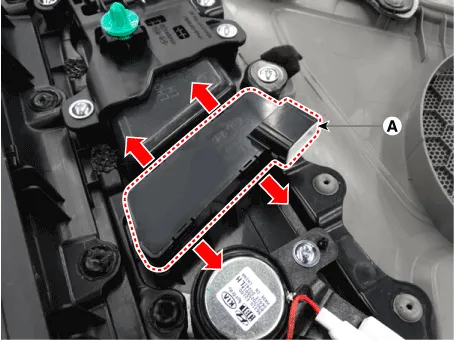
| 3. | Disconnect the memory power seat switch connector (A).
|

| 4. | Remove the memory power switch (A) after disengaging the mounting clips.
|
| Installation |
| 1. | Install the memory power seat control switch (IMS). |
| 2. | Install the door trim. |
| 3. | Connect the negative (-) battery terminal. |
| Inspection |
| 1. | Remove the memory power seat connector
|
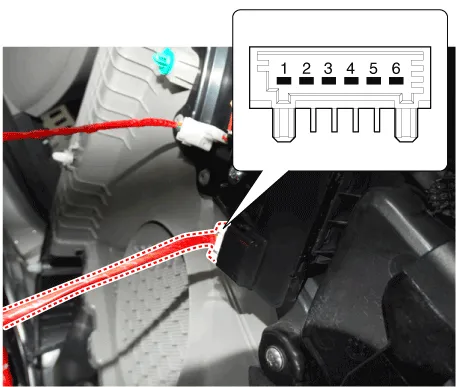
| 2. | When each switch is pressed, check the electricity flow between memory power seat switch connector and grounding, and if the electricity does not match the specification, replace the switch.
|

Other information:
Hyundai Ioniq (AE) 2017-2022 Service & Repair Manual: emperature Control Actuator. Specifications
S
Hyundai Ioniq (AE) 2017-2022 Service & Repair Manual: Rear Corner Safety ON/OFF Switch. Repair procedures
Inspection1.Disconnect the negative (-) battery terminal.2.Remove the crash pad lower panel.(Refer to Body - "Crash Pad Lower Panel")3.Remove the lower crash pad switch assembly (A) after disengaging the mounting clip.4.Remove the rheostat switch connector (A).
Categories
- Manuals Home
- Hyundai Ioniq Owners Manual
- Hyundai Ioniq Service Manual
- Brake System
- Hybrid Vehicle Engine Compartment
- Engine Clutch System
- New on site
- Most important about car

Copyright В© 2026 www.hioniqae.com - 0.0189