
Hyundai Ioniq (AE): Convenient features of your vehicle / LCD Display
LCD Display Control
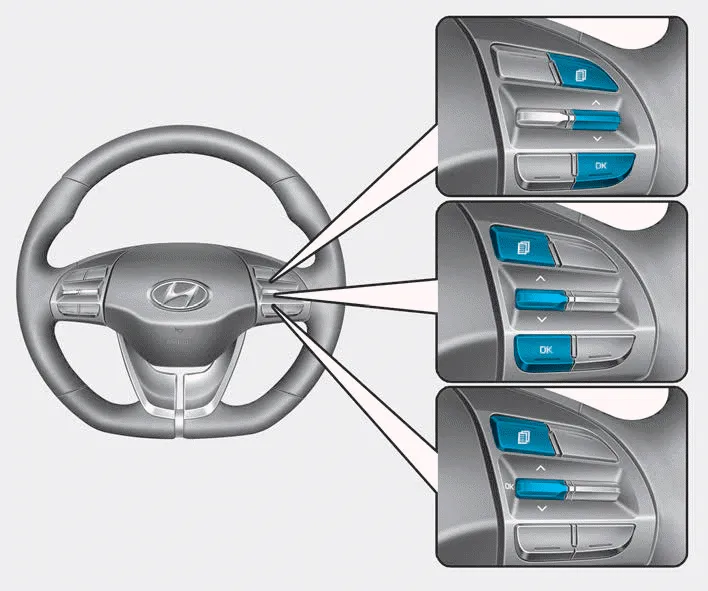
The LCD display modes can be changed by using the control buttons.
(1)  : MODE button for changing modes
(2)  :MOVE switch for changing items
(3) OK : SELECT/RESET button for setting or resetting the selected item
Switching to Hybrid mode to lubricate engine (Plug-in hybrid vehicle) This message is displayed when the vehicle is automatically switched to the HEV mode to lubricate engine while the Engine Start/Stop button is in the ON position.
Edit settings after shifting to P/ Shift to P to edit settings Either message appears if you try to adjust the User Settings while driving. For your safety, change the User Settings after parking the vehicle, applying the parking brake and moving the shift lever to P (Park).
Other information:
Hyundai Ioniq (AE) 2017-2022 Service & Repair Manual: Mode Control Actuator. Components and components location
C
Hyundai Ioniq (AE) 2017-2022 Service & Repair Manual: Auto Defoging Actuator. Description and operation
DescriptionThe auto defogging sensor is installed on front window glass. The sensor judges and sends signal if moisture occurs to blow out wind for defogging. The air conditioner control module receives a signal from the sensor and restrains moisture and eliminates defog by the intake actuator, A/C, auto defogging actuator, blower motor rpm and mod
Categories
- Manuals Home
- Hyundai Ioniq Owners Manual
- Hyundai Ioniq Service Manual
- Hybrid Vehicle Engine Compartment
- Components and components location
- Transmission Gear Oil. Repair procedures
- New on site
- Most important about car
