
Hyundai Ioniq (AE): Windshield Wiper/Washer / Windshield Wiper-Washer Switch. Repair procedures
Hyundai Ioniq (AE) 2017-2022 Service & Repair Manual / Body Electrical System / Windshield Wiper/Washer / Windshield Wiper-Washer Switch. Repair procedures
| Removal |
| 1. | Disconnect the negative (-) battery terminal. |
| 2. | If it is necessary to remove multifunction switch assembly, remove the steering wheel. (Steering System - "Steering Wheel") |
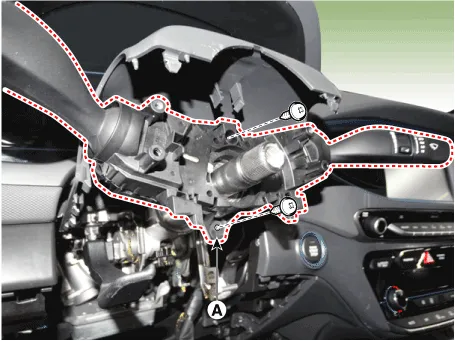
| 3. | Remove the steering column upper shrouds (A). (Refer to Body - "Steering Column Shroud Panel") |
| 4. | Remove the clock spring. (Refer to Restraint - "Driver Airbag (DAB) Module and Clock Spring") |
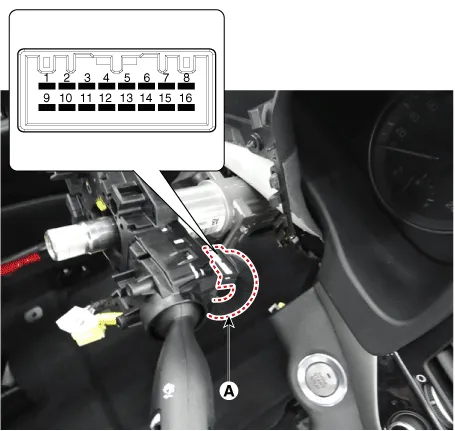
| 5. | Disconnect the multifunction switch connector (A).
|

| 6. | Loosen the screws (2EA) from the multifunction switch assembly (A).
|
| Installation |
| 1. | Install the multifunction switch. |
| 2. | Install the clock spring and steering wheel. |
| 3. | Install the steering column upper and lower shrouds. |
| 4. | Install the steering wheel. |
| Inspection (with GDS) |
| 1. | When each switch is pressed, check the electricity flow between multi-function switch connector and grounding, and if the electricity does not match the specification, replace the switch.
|
| 2. | The body electrocal system can be quickly diagnosed failed parts with vehicle diagnostic system (GDS). The diagnostic system (GDS) provides the following information.
|
| 3. | Select the "Car Model" and the system to be checked in order to check the vehicle with the tester. |
| 4. | Select the "Body Control Module (BCM)" to check the Body Control Module (BCM). |
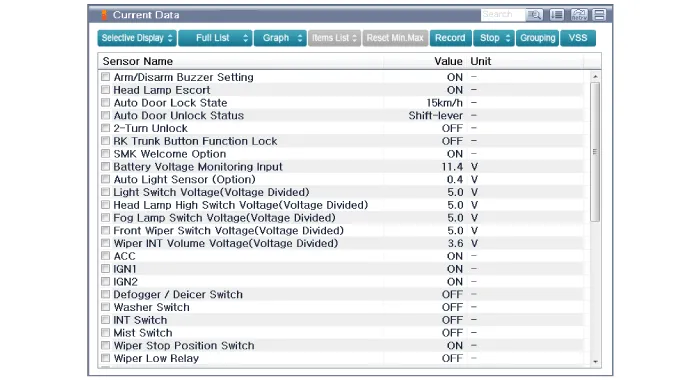
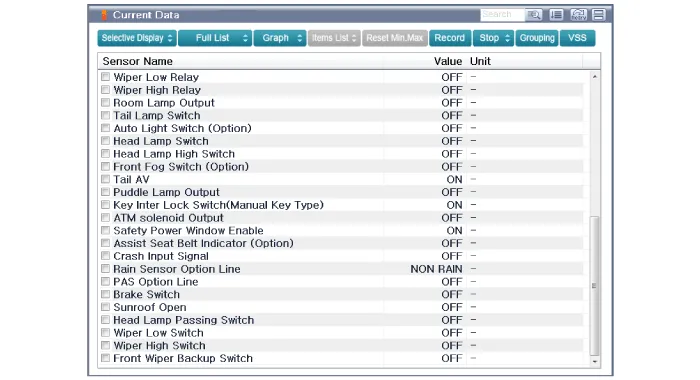
| 5. | Select the "Current Data" menu to search the current state of the input/output data. The input/output data for the sensors corresponding to the Body Control Module (BCM) can be checked.
|
Component Location1. Windshield wiper arm & blade2. Wiper & washer switch3. Windshield washer hose & nolzzle4. Washer motor & linkage assembly5.
Component Location1. Cap2. Nut3. Wiper arm & blade4. Rivet5. Cowl top cover6. Bolt7. Wiper motor & linkage assembly8. Wiper motor connector
Categories
- Manuals Home
- Hyundai Ioniq Owners Manual
- Hyundai Ioniq Service Manual
- Components and components location
- Jump starting procedure
- Engine Control/Fuel System
- New on site
- Most important about car

Copyright © 2026 www.hioniqae.com - 0.0128