
Hyundai Ioniq (AE): Floor Console / Rear Console Cover. Repair procedures
Hyundai Ioniq (AE) 2017-2022 Service & Repair Manual / Body (Interior and Exterior) / Floor Console / Rear Console Cover. Repair procedures
| Replacement |
|

|

| 1. | Remove the floor console assembly. (Refer to Floor Console - "Floor Console Assembly") |
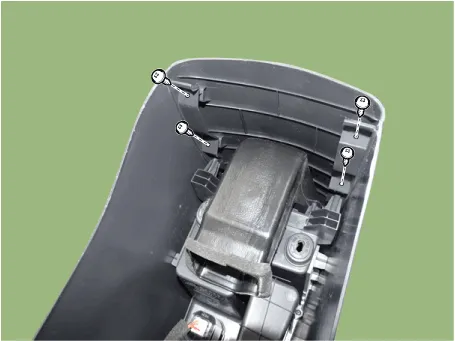
| 2. | Loosen the rear console mounting screws.
|
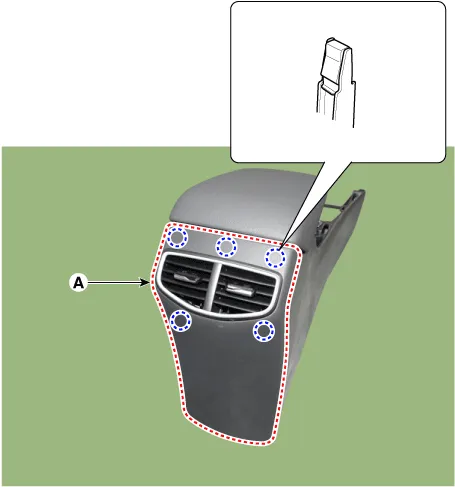
| 3. | Using a screwdriver or remover, remove the rear console cover (A).
|
| 4. | To install, reverse the removal procedure.
|

Component Location 1. Rear console cover
Component Location 1. Console armrest
Other information:
Hyundai Ioniq (AE) 2017-2022 Service & Repair Manual: Auto Defoging Actuator. Description and operation
DescriptionThe auto defogging sensor is installed on front window glass. The sensor judges and sends signal if moisture occurs to blow out wind for defogging. The air conditioner control module receives a signal from the sensor and restrains moisture and eliminates defog by the intake actuator, A/C, auto defogging actuator, blower motor rpm and mod
Hyundai Ioniq (AE) 2017-2022 Service & Repair Manual: Blower Unit. Components and components location
Component Location1. Blower unit assembly Components1. Duct Seal2. Intake duct case3. Air intake door assembly4. Intake door5. Seal6. Intake duct case (A)7. Air filter cover (A)8. Intake actuator9. Air filter cover10. Air filter 11. Blower unit pad12.
Categories
- Manuals Home
- Hyundai Ioniq Owners Manual
- Hyundai Ioniq Service Manual
- Coolant. Repair procedures
- Transmission Gear Oil. Repair procedures
- Troubleshooting
- New on site
- Most important about car

Copyright © 2026 www.hioniqae.com - 0.0122