
Hyundai Ioniq (AE): Rear View Monitor (RVM) / Repair procedures
| Removal |
| 1. | Disconnect the negative (-) battery terminal. |
| 2. | Remove the tailgate lid trim. (Refer to Body - "TailGate Lid Trim") |
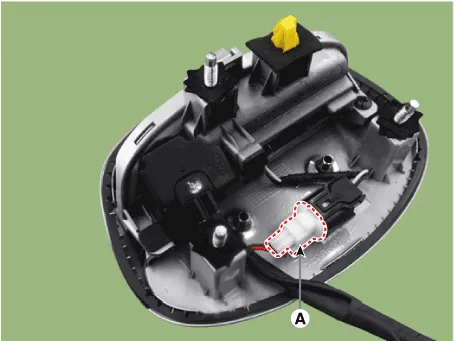
| 3. | Disconnect the Rear view camera connector (A).
|
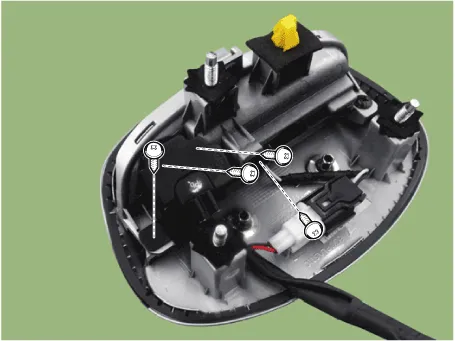
| 4. | Remove the Rear view camera assembly after loosening the mounting screws.
|
| Installation |
| 1. | Install the back view camera. |
| 2. | Install the tailgate lid trim. |
| 3. | Connect the negative (-) battery terminal. |
DescriptionRear view monitor (RVM) will activate when the backup light is ON with the ignition switch ON and the shift lever in the R position.This system is a supplemental system that shows behind the vehicle through the AV monitor while backing-up.
Other information:
Hyundai Ioniq (AE) 2017-2022 Service & Repair Manual: Auto Defoging Actuator. Description and operation
DescriptionThe auto defogging sensor is installed on front window glass. The sensor judges and sends signal if moisture occurs to blow out wind for defogging. The air conditioner control module receives a signal from the sensor and restrains moisture and eliminates defog by the intake actuator, A/C, auto defogging actuator, blower motor rpm and mod
Hyundai Ioniq (AE) 2017-2022 Service & Repair Manual: High voltage shut-off procedures
High Voltage Shut-off Procedures • Be sure to read and follow the "General Safety Information and Caution" before doing any work related with the high voltage system. Failure to follow the safety instructions may result in serious electrical injuries.
Categories
- Manuals Home
- Hyundai Ioniq Owners Manual
- Hyundai Ioniq Service Manual
- General Information
- Transmission Gear Oil. Repair procedures
- Hybrid Control System
- New on site
- Most important about car
