
Hyundai Ioniq (AE): Hybrid Motor Cooling System / Electric Water Pump(EWP). Repair procedures
| Removal |
| 1. | Remove the 12 V battery (-) cable. |
| 2. | Remove the undercover. (Refer to Engine Mechanical System - "Engine Room Undercover".) |
| 3. | Drain the coolant from the hybrid cooling system. (Refer to Hybrid Motor Cooling System - "Coolant".) |
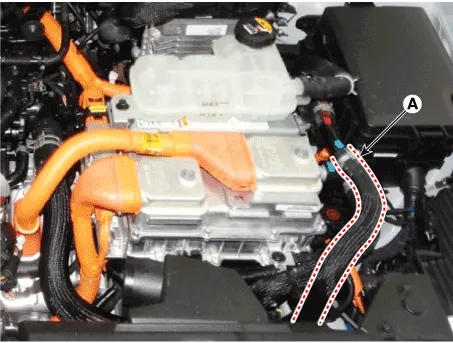
| 4. | Disconnect the hose (A) from the reservoir tank.
|
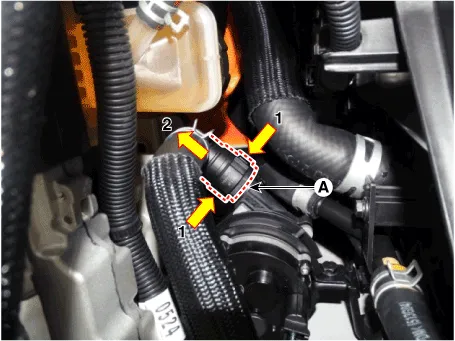
| 5. | Disconnect the hose (A).
|
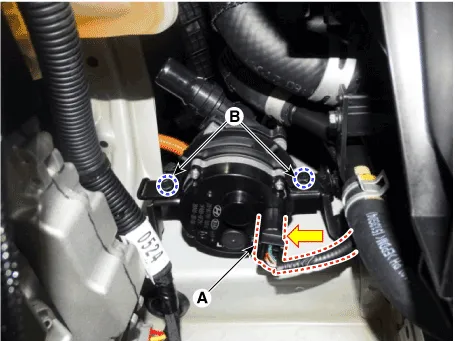
| 6. | Unscrew the mounting bolt (A).
|

| 7. | Disconnect the connector (A). |
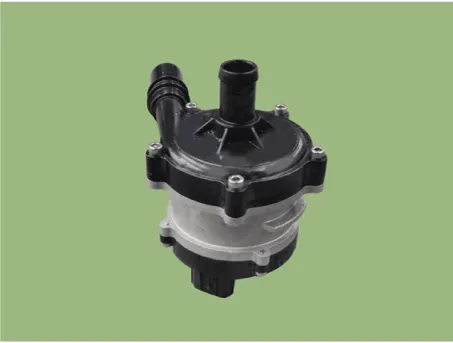
| 8. | Remove the electric water pump (EWP) after removing the bolts(B).
|
| Installation |
| 1. | To install, reverse the removal procedure.
|

Component location1. HPCU (Hybrid Power Control Unit)(LDC+MCU+HCU+Reservoir)2. Hybrid drive motor3. Hybrid starter generator (HSG)4. Electrical radiator5.
Changing the Coolant and Performing Air Bleeding Never remove the cap while the engine is hot. When you remove the cap from the reservoir, hot coolant may spew out due to the high pressure, causing serious injury.
Other information:
Hyundai Ioniq (AE) 2017-2022 Service & Repair Manual: Ambient Temperature Sensor. Repair procedures
Inspection1.Check the resistance of the ambient temperature sensor between terminals 1 and 2 whether it changes by changing the ambient temperature.1. Ambient Sensor (+)2. Sensor groundSpecification Ambient temperature [°C (°F)] Resistance between terminal 1 and 2 (
Hyundai Ioniq (AE) 2017-2022 Service & Repair Manual: Repair procedures
Diagnosis with GDS1.REAR CORENER RADAR system defects can be quickly diagnosed with the GDS. GDS operates actuator quickly to monitor, input/output value and self diagnosis.2.Connect the cable of GDS to the data link connector in driver side crash pad lower panel, turn the power on GDS.
Categories
- Manuals Home
- Hyundai Ioniq Owners Manual
- Hyundai Ioniq Service Manual
- Jump starting procedure
- If the 12 Volt Battery is Discharged (Hybrid Vehicle)
- Hybrid Vehicle Engine Compartment
- New on site
- Most important about car
