
Hyundai Ioniq (AE): Front Door / Front Door Window Glass. Repair procedures
Hyundai Ioniq (AE) 2017-2022 Service & Repair Manual / Body (Interior and Exterior) / Front Door / Front Door Window Glass. Repair procedures
| Replacement |
| 1. | Remove the front door trim. (Refer to Front Door - "Front Door Trim") |
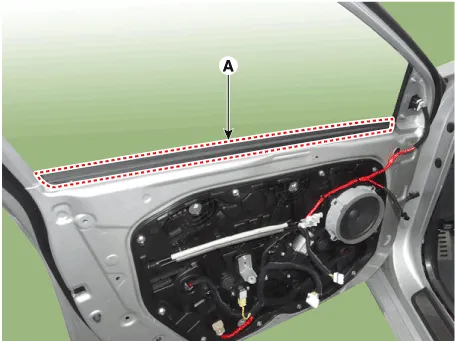
| 2. | Remove the front door belt inside weatherstrip (A).
|
| 3. | Separate the mounting plug hole (A) from the front door module.
|
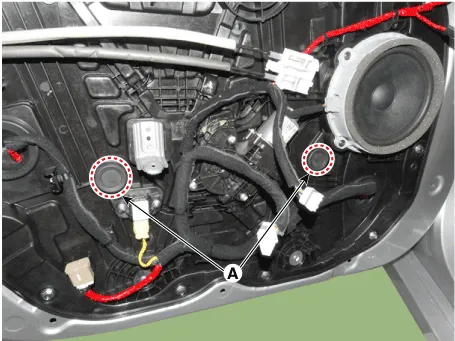
| 4. | Lower the glass by operating the power window switch until the glass mounting bolt is exposed in the plug hole.
|


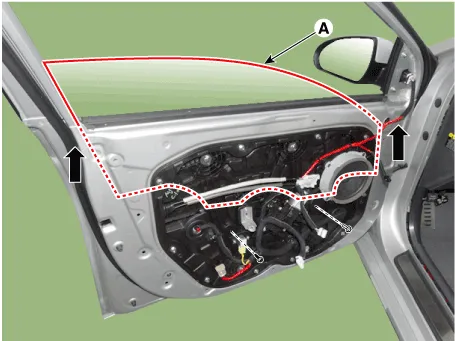
| 5. | After loosening the glass mounting bolts, adjust the spacing of the glass (A) by moving the glass from side to side and then tighten the bolts.
|
| 6. | To install, reverse the removal procedure.
|
Component Location 1. Front door window glass
Component Location 1. Front door module
Other information:
Hyundai Ioniq (AE) 2017-2022 Service & Repair Manual: Auto Defoging Actuator. Repair procedures
Inspection1.Turn the ignition switch OFF. 2.Disconnect the auto defogging connector. 3.Verify that the auto defogging actuator operates to the open position when connecting 12V to terminal 3 and grounding terminal 4. Verify that the auto defogging actuator operates to the close position when connected in reverse.
Hyundai Ioniq (AE) 2017-2022 Service & Repair Manual: Repair procedures
Diagnosis with GDS1.REAR CORENER RADAR system defects can be quickly diagnosed with the GDS. GDS operates actuator quickly to monitor, input/output value and self diagnosis.2.Connect the cable of GDS to the data link connector in driver side crash pad lower panel, turn the power on GDS.
Categories
- Manuals Home
- Hyundai Ioniq Owners Manual
- Hyundai Ioniq Service Manual
- Hybrid Control System
- General Information
- Body (Interior and Exterior)
- New on site
- Most important about car

Copyright © 2026 www.hioniqae.com - 0.0239