
Hyundai Ioniq (AE): Smart Cruise Control System / Limitations of the System
The Smart Cruise Control System may have limits to its ability to detect distance to the vehicle ahead due to road and traffic conditions.
On curves
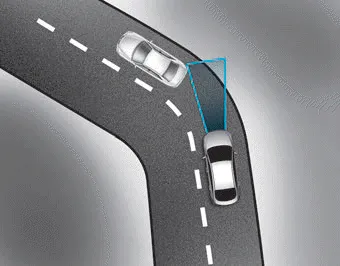
- The Smart Cruise Control System may not detect a moving vehicle in your lane, and then your vehicle could accelerate to the set speed. Also, the vehicle speed will decrease when the vehicle ahead is recognized suddenly.
- Select the appropriate set speed on curves and apply the brakes or accelerator pedal if necessary.
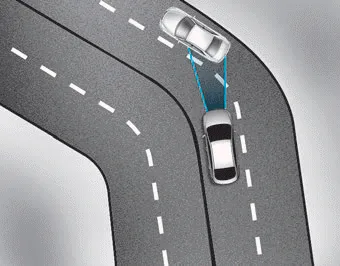
Your vehicle speed can be reduced due to a vehicle in the adjacent lane.
Apply the accelerator pedal and select the appropriate set speed. Check to be sure that the road conditions permit safe operation of the Smart Cruise Control.
On inclines

- During uphill or downhill driving, the Smart Cruise Control System may not detect a moving vehicle in your lane, and cause your vehicle to accelerate to the set speed. Also, the vehicle speed will rapidly decrease when the vehicle ahead is recognized suddenly.
- Select the appropriate set speed on inclines and apply the brake or accelerator pedal if necessary.
Lane changing
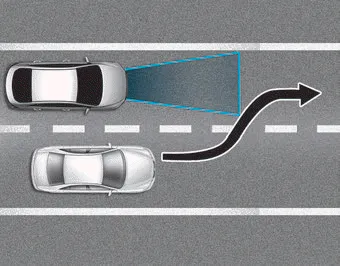
- A vehicle which moves into your lane from an adjacent lane cannot be recognized by the sensor until it is in the sensor's detection range.
- The radar may not detect immediately when a vehicle cuts in suddenly. Always pay attention to the traffic, road and driving conditions.
- If a slower vehicle moves into your lane, your speed may decrease to maintain the distance to the vehicle ahead.
- If a faster vehicle which moves into your lane, your vehicle will accelerate to the set speed.
Detecting vehicles
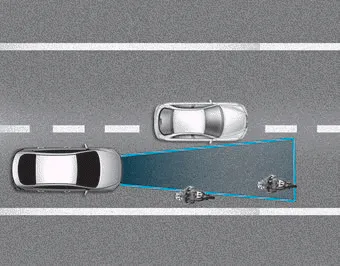
Some vehicles in your lane cannot be recognized by the sensor:
- Narrow vehicles such as motorcycles or bicycles
- Vehicles offset to one side
- Slow-moving vehicles or suddendecelerating vehicles
- Stopped vehicles
- Vehicles with small rear profile such as trailers with no loads
A vehicle ahead cannot be recognized correctly by the sensor if any of following occurs:
- When the vehicle is pointing upwards due to overloading in the luggage compartment
- While the steering wheel is operating
- When driving to one side of the lane
- When driving on narrow lanes or on curves
Apply the brake or accelerator pedal if necessary.
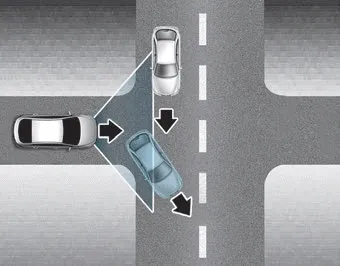
- Your vehicle may accelerate when a vehicle ahead of you disappears.
- When you are warned that the vehicle ahead of you is not detected, drive with caution.
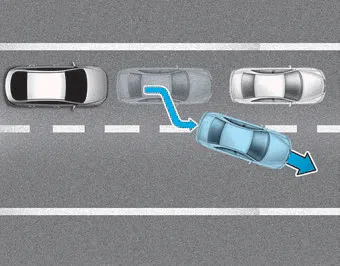
- When driving in stop-and-go traffic, and a stopped vehicle in front of you merges out of the lane, the system may not immediately detect the new vehicle that is now in front of you. In this case, you must maintain a safe braking distance, and if necessary, depress the brake pedal to reduce your driving speed in order to maintain a safe distance.
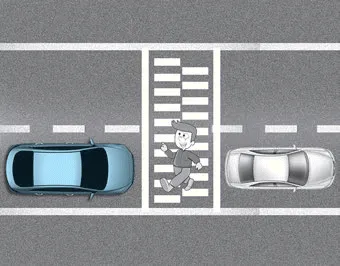
• Always look out for pedestrians when your vehicle is maintaining a distance with the vehicle ahead.
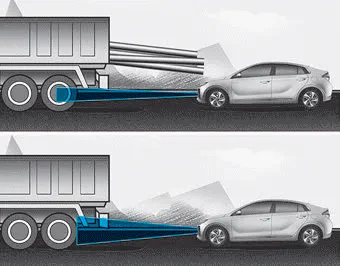
• Always be cautious for vehicles with higher height or vehicles carrying loads that sticks out from the back of the vehicle.
WARNING
When using the Smart Cruise Control take the following precautions:
- If an emergency stop is necessary, you must apply the brakes. The vehicle cannot be stopped at every emergency situation by using the Smart Cruise Control System.
- Keep a safe distance according to road conditions and vehicle speed. If the vehicle to vehicle distance is too close during a high-speed driving, a serious collision may result.
- Always maintain sufficient braking distance and decelerate your vehicle by applying the brakes if necessary.
- The Smart Cruise Control System cannot recognize a stopped vehicle, pedestrians or an oncoming vehicle. Always look ahead cautiously to prevent unexpected and sudden situations from occurring.
- Vehicles moving in front of you with a frequent lane change may cause a delay in the system's reaction or may cause the system to react to a vehicle actually in an adjacent lane. Always drive cautiously to prevent unexpected and sudden situations from occurring.
- Always be aware of the selected speed and vehicle to vehicle distance. The driver should not solely rely on the system but always pay attention to driving conditions and control your vehicle speed.
- The Smart Cruise Control System may not recognize complex driving situations so always pay attention to driving conditions and control your vehicle speed.
NOTICE
The Smart Cruise Control System may not operate temporarily due to:
- Electrical interference
- Modifying the suspension
- Differences of tire abrasion or tire pressure
- Installing different type of tires
Information
This device complies with Part 15 of the FCC rules.
Operation is subject to the following three conditions:
1. This device may not cause harmful interference, and
2. This device must accept any interference received, including interference that may cause undesired operation.
3. Changes or modifications not expressly approved by the party responsible for compliance could void the user's authority to operate the device.
Information
Radio frequency radiation exposure information:
This equipment complies with FCC radiation exposure limits set forth for an uncontrolled environment.
This equipment should be installed and operated with minimum distance of 8 in. (20 cm) between the radiator (antenna) and your body.
This transmitter must not be co-located or operating in conjunction with any other antenna or transmitter.
The driver may choose to switch to use the conventional Cruise Control mode (speed only control function) by following these steps: 1. Push the CRUISE button on the steering wheel to turn the system on.
Hazardous Driving Conditions When hazardous driving elements are encountered such as water, snow, ice, mud and sand, take the below suggestions: Drive cautiously and keep a longer braking distance.
Other information:
Hyundai Ioniq (AE) 2017-2022 Service & Repair Manual: A/C Pressure Transducer. Description and operation
DescriptionThe A/C Pressure Transducer (APT) converts the pressure value of high pressure line into voltage value after measuring it. By converted voltage value, engine ECU controls the cooling fan by operating it high speed or low speed. Engine ECU stops the operation of the compressor when the temperature of refrigerant line is very high or very
Hyundai Ioniq (AE) 2017-2022 Service & Repair Manual: Ambient Temperature Sensor. Description and operation
DescriptionThe ambient temperature sensor is located at the front of the condenser and detects ambient air temperature. It is a negative type thermistor; resistance will increase with lower temperature, and decrease with higher temperature.The sensor output will be used for discharge temperature control, temperature regulation door contrl, blower m
Categories
- Manuals Home
- Hyundai Ioniq Owners Manual
- Hyundai Ioniq Service Manual
- General Information
- Troubleshooting
- Suspension System
- New on site
- Most important about car
