
Hyundai Ioniq (AE): LKA System Operation / LKA system activation
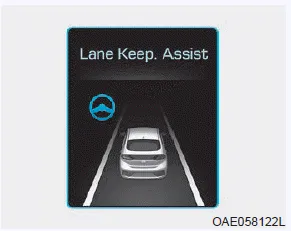
- To see the LKA system screen on the LCD display in the cluster, select SCC/LKA
mode (
 ) for cluster type A or ASSIST
mode (
) for cluster type A or ASSIST
mode ( ) for cluster type B. For
more information, refer to "LCD Display Modes" in chapter 3.
) for cluster type B. For
more information, refer to "LCD Display Modes" in chapter 3. - When both lane markers are detected and all the conditions to activate the LKA system are satisfied, a green steering wheel indicator will illuminate and the LKA system indicator light will change from white to green. This indicates that the LKA system is in the ENABLED state and the steering wheel will be able to be controlled.
WARNING
The Lane Keeping Assist (LKA) System is a system to prevent the driver from leaving the lane. However, the driver should not solely rely on the system but always check the road conditions when driving.
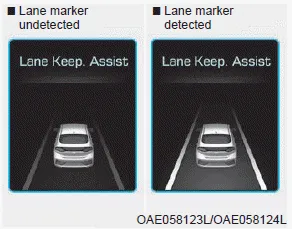
- If vehicle speed is over 40 mph (64 km/h) and the system detects lane markers, the color changes from gray to white.
- If the system detects the left lane marker, the left lane marker color will change from gray to white.
- If the system detects the right marker line, the right lane marker color will change from gray to white.
- Both lane markers must be detected for the system to fully activate.
- If your vehicle speed exceeds 40 mph (64 km/h) and the LKA system button is ON, the system is enabled. If your vehicle departs from the projected lane in front of you, the LKA system operates as follows:
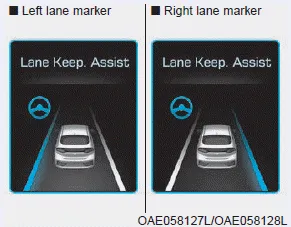
A visual warning appears on the cluster LCD display. Either the left lane marker or the right lane marker in the cluster LCD display will blink depending on which direction the vehicle is veering.
If the steering wheel appears, the system will control the vehicle's steering to prevent the vehicle from crossing the lane marker.
Keep hands on steering wheel
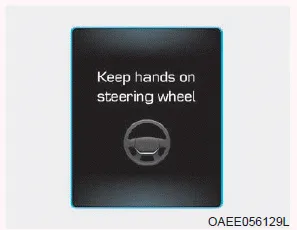
If the driver takes their hands off the steering wheel for several seconds while the LKA system is activated, the system will warn the driver.
Information
If the steering wheel is held very lightly the message may still appear because the LKA system may not recognize that the driver has their hands on the wheel.
WARNING
The warning message may appear late according to road conditions. Therefore, always have your hands on the steering wheel while driving.
Driver's grasp not detected. LKA system will be disabled temporarily
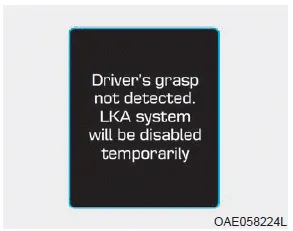
If the driver still does not have their hands on the steering wheel after the message "Keep hands on steering wheel", the system will not control the steering wheel and warn the driver only when the driver crosses the lane markers.
However, if the driver has their hands on the steering wheel again, the system will start controlling the steering wheel.
WARNING
- The driver is responsible for accurate steering.
- Turn off the system in below situations.
- In bad weather
- In bad road condition
- When the steering wheel needs to be controlled by the driver frequently.
Information
- Even though the steering is assisted by the system, the driver can still steer to control the steering wheel.
- The steering wheel may feel heavier when the steering wheel is assisted by the system than when it is not.
To activate/deactivate the LKA system: With the Engine Start/Stop button in the ON position, press the LKA system button located on the instrument panel on the left hand side of the steering wheel.
Check Lane Keeping Assist (LKA) system If there is a problem with the system a message will appear for a few seconds. If the problem continues the LKA system failure indicator will illuminate.
Other information:
Hyundai Ioniq (AE) 2017-2022 Service & Repair Manual: Repair procedures
Self Diagnosis1.Self-diagnosis process. • When operating the self-diagnostics, the below fault (self-diagnostics code) will blink at 0.5 seconds interval on the temperature display settings (driver's side only) and the remaining symbols are OFF .
Hyundai Ioniq (AE) 2017-2022 Service & Repair Manual: Repair procedures
Diagnosis with GDS1.REAR CORENER RADAR system defects can be quickly diagnosed with the GDS. GDS operates actuator quickly to monitor, input/output value and self diagnosis.2.Connect the cable of GDS to the data link connector in driver side crash pad lower panel, turn the power on GDS.
Categories
- Manuals Home
- Hyundai Ioniq Owners Manual
- Hyundai Ioniq Service Manual
- Hybrid Control System
- Body (Interior and Exterior)
- Maintenance
- New on site
- Most important about car
