
Hyundai Ioniq (AE): Driving the Hybrid/Plug-in Hybrid Vehicle / Plug-in Hybrid Mode (Plug-in hybrid vehicle)
EV/HEV Button
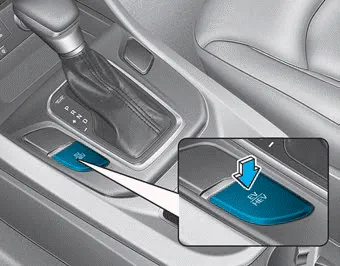
Pressing the [EV/HEV] button changes the plug-in hybrid system modes, between Electric (CD) mode and Hybrid (CS) mode.
Each time the mode is changed a corresponding indicator is displayed on the instrument cluster as follows.
Plug-in Hybrid Mode Indicator
• CD (Charge Depleting, Electric) mode

: The high-voltage (hybrid) battery is used to drive the vehicle.
• CS (Charge Sustaining, Hybrid) mode
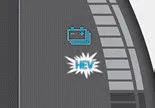
: The high-voltage (hybrid) battery and gasoline engine is used to drive the vehicle.
Information
Even when the battery charging rate is high and driving in electric mode is possible, engine may turn on in some areas to protect the system.
The hybrid system gauge indicates whether the current driving condition is fuel efficient or not. • CHARGE : Shows that the energy made by the vehicle is being converted to electrical energy.
Press [PHEV] on the [Home] screen or the [All menus] screen and the menus related to plug-in hybrid ([ECO Driving], [Energy Information], [EV Range], [Charging Settings], [Charging Stations], [Gas Stations]) are displayed.
Other information:
Hyundai Ioniq (AE) 2017-2022 Service & Repair Manual: Rear Corner Safety ON/OFF Switch. Repair procedures
Inspection1.Disconnect the negative (-) battery terminal.2.Remove the crash pad lower panel.(Refer to Body - "Crash Pad Lower Panel")3.Remove the lower crash pad switch assembly (A) after disengaging the mounting clip.4.Remove the rheostat switch connector (A).
Hyundai Ioniq (AE) 2017-2022 Service & Repair Manual: Description and operation
System OverviewParking Distance Warning (PDW) is an electronic driving aid that warns the driver to be cautious while parking or driving at low speed. The sensor uses ultrasonic waves to detect objects within proximity of the vehicle.PDW consists of four RPS sensors which are detecting the obstacles and transmit the result separated into three war
Categories
- Manuals Home
- Hyundai Ioniq Owners Manual
- Hyundai Ioniq Service Manual
- Components and components location
- Jump starting procedure
- Description and operation
- New on site
- Most important about car
