
Hyundai Ioniq (AE): Rear Bumper / Rear Bumper beam Assembly. Repair procedures
Hyundai Ioniq (AE) 2017-2022 Service & Repair Manual / Body (Interior and Exterior) / Rear Bumper / Rear Bumper beam Assembly. Repair procedures
| Replacement |
|

|

| 1. | Remove the rear bumper cover. (Refer to Rear Bumper - "Rear Bumper Cover") |
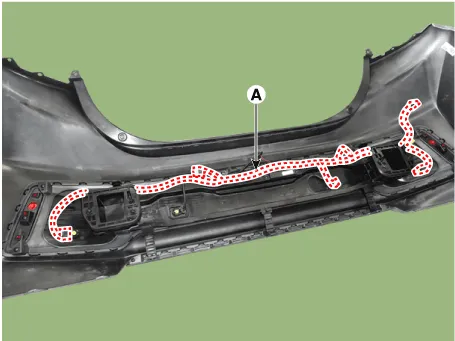
| 2. | Disconnect the rear bumper beam mounting wiring harness (A).
|
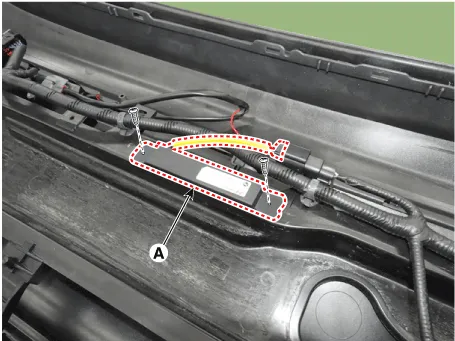
| 3. | Loosen the mounting bolts and remove the smart key antenna (A).
|
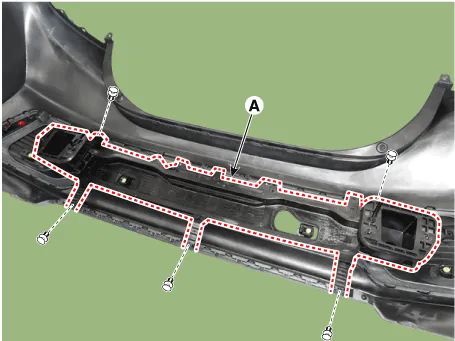
| 4. | After loosening the mounting clips, remove the rear bumper beam assembly (A).
|
| 5. | To install, reverse the removal procedure.
|

Component Location 1. Rear bumper beam assembly
Other information:
Hyundai Ioniq (AE) 2017-2022 Service & Repair Manual: Ambient Temperature Sensor. Description and operation
DescriptionThe ambient temperature sensor is located at the front of the condenser and detects ambient air temperature. It is a negative type thermistor; resistance will increase with lower temperature, and decrease with higher temperature.The sensor output will be used for discharge temperature control, temperature regulation door contrl, blower m
Hyundai Ioniq (AE) 2017-2022 Service & Repair Manual: Blower Unit. Components and components location
Component Location1. Blower unit assembly Components1. Duct Seal2. Intake duct case3. Air intake door assembly4. Intake door5. Seal6. Intake duct case (A)7. Air filter cover (A)8. Intake actuator9. Air filter cover10. Air filter 11. Blower unit pad12.
Categories
- Manuals Home
- Hyundai Ioniq Owners Manual
- Hyundai Ioniq Service Manual
- Description and operation
- Engine Clutch System
- Hybrid Vehicle Engine Compartment
- New on site
- Most important about car

Copyright © 2026 www.hioniqae.com - 0.026