Hyundai Ioniq (AE): Audio / Speakers. Repair procedures

Inspection
1.
Troubleshooting for Speaker
(1)
Basic inspection of speaker
Inspect the sound from speaker after verifying that the speaker mounting screws is removed and the wiring connector is connected precisely to remove vibration transmitted from body trims and surrounding parts.

(2)
Case Troubleshooting
No
Case
Inspection/Remedy
1
Trembling sound
1)
Before replacing the speaker, inspect that the mounting screw is installed normally.
2)
After re-installing the speaker, verify that no trembling sound is heard.
3)
When hearing a trembling sound again, replace the speaker with new one.
2
Noise
1)
Check if the wiring connector is connected normally. If not, reconnect the wiring connector.
2)
In case of radio static, check if there is a noise from CD player.
3)
When a noise is heard on turning radio and CD on, replace the speaker with new one.
   
•
In case there is only radio static, this causes from poor radio reception. Thus the speaker needs no repair and replacement.
3
Poor working
Inspection of the wiring connection between the battery and the speaker
1)
Before replacing the speaker, inspect the wiring and connections in the speaker circuit.
2)
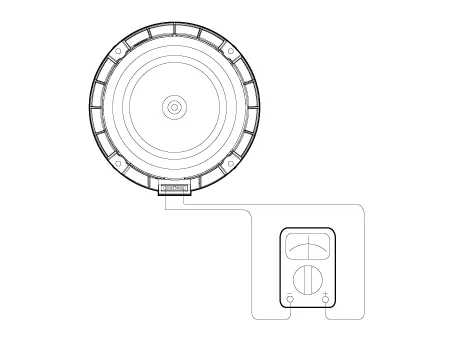
Check the supplying power to the speaker and the resistance, and then inspect the sound quality.

3)
If the speaker works poorly, replace it with new one.

   
•
During dealing of speaker
•
Dropping or rough handling of the speaker can cause damage.
•
Be careful not to cover water and oil over the speaker.
•
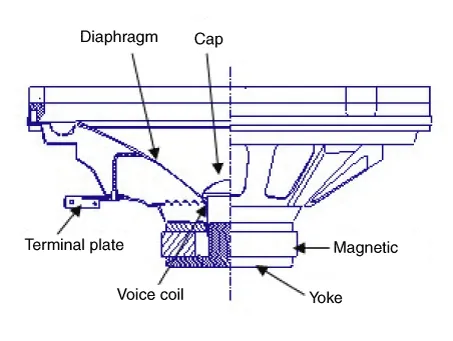
Caution during dealing of speaker because the material of diaphragm is paper which is easy to be torn by impact and external force.
•
When modifying audio system as customer pleases, this does electric damage to speaker.
•
And, in this case the speakers are not covered by the manufacturer's warranty.
Removal
[Front Door Speakers]
1.
Disconnect the negative (-) battery terminal.
2.
Remove the front door trim.
(Refer to Body - "Front Door Trim")
3.
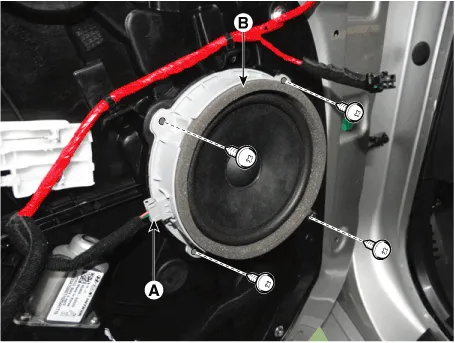
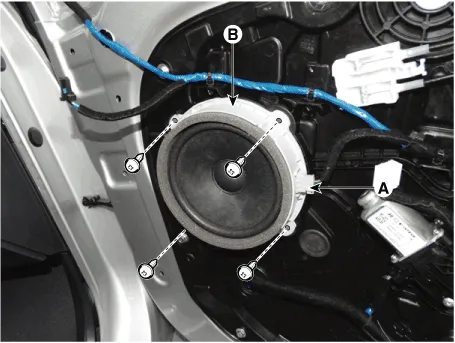
Remove the front door speaker (B) after disconnecting the connector (A) and loosening the screws.

[Front Door Tweeter Speaker]
1.
Disconnect the negative (-) battery terminal.
2.
Remove the front door trim.
(Refer to Body - "Front Door Trim")
3.
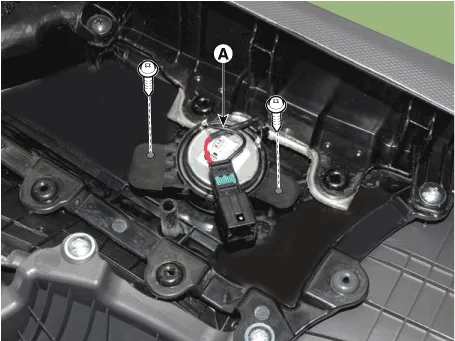
Remove the tweeter speaker (A) after loosening the screws.

[Rear Door Speakers ]
1.
Disconnect the negative (-) battery terminal.
2.
Remove the rear door trim.
(Refer to Body - "Rear Door Trim")
3.
Remove the rear door speaker (B) after disconnecting the connector (A) and loosening the screws.

Installation
Front Door Speaker
1.
Install the front door speaker.
2.
Install the front door trim.
3.
Connect the negative (-) battery terminal.
Front Door Tweeter Speakers
1.
Install the front door tweeter speaker.
2.
Install the front door trim.
3.
Connect the negative (-) battery terminal.
Rear Door Speaker
1.
Install the rear door speaker.
2.
Install the front door trim.
3.
Connect the negative (-) battery terminal.
   
•
Make sure the speaker connectors are plugged in properly.

    Removal1.Disconnect the negative (-) battery terminal.2.Remove the cluster fascia panal.(Refer to Body - "Center Fascia Panal")3.Remove the crash pad garnish RH.

    InspectionAntenna Cable1.Check for continuity between the center poles of antenna cable.2.Check for continuity between the outer poles of antenna cable.

    Other information:

    Hyundai Ioniq (AE) 2017-2022 Service & Repair Manual: Auto Defoging Actuator. Repair procedures

    Inspection1.Turn the ignition switch OFF. 2.Disconnect the auto defogging connector. 3.Verify that the auto defogging actuator operates to the open position when connecting 12V to terminal 3 and grounding terminal 4. Verify that the auto defogging actuator operates to the close position when connected in reverse.

    Hyundai Ioniq (AE) 2017-2022 Service & Repair Manual: Description and operation

    DescriptionIn ordinary cars, the mechanical water pump mounted on the engine for heating purposes is activated to circulate the cooling water, but in hybrid cars, AEWP is used to circulate the cooling water when the engine is not operating. Classification System Cooling water used

    Categories

     
    Copyright © 2026 www.hioniqae.com - 0.0129