
Hyundai Ioniq (AE): Trip Computer / Trip modes
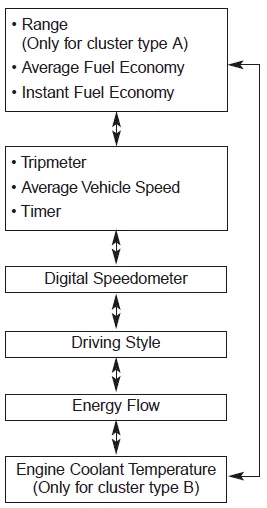
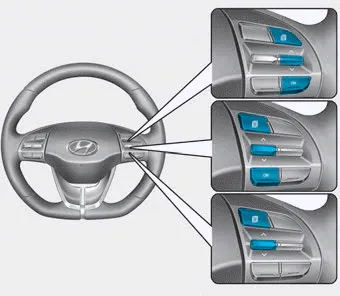
To change the trip mode, toggle the " ,
,.webp) " switch on the steering wheel.
" switch on the steering wheel.
The trip computer is a microcomputer- controlled driver information system that displays information related to driving. Information Some driving information stored in the trip computer (for example Average Vehicle Speed) resets if the battery is disconnected.
Range (1) The range is the estimated distance the vehicle can be driven with the remaining fuel. If the estimated distance is below 1 mi. (1 km), the trip computer will display "----" as range.
Other information:
Hyundai Ioniq (AE) 2017-2022 Service & Repair Manual: Auto Defoging Actuator. Components and components location
C
Hyundai Ioniq (AE) 2017-2022 Service & Repair Manual: Repair procedures
Diagnosis with GDS1.REAR CORENER RADAR system defects can be quickly diagnosed with the GDS. GDS operates actuator quickly to monitor, input/output value and self diagnosis.2.Connect the cable of GDS to the data link connector in driver side crash pad lower panel, turn the power on GDS.
Categories
- Manuals Home
- Hyundai Ioniq Owners Manual
- Hyundai Ioniq Service Manual
- DCT(Dual Clutch Transmission) System
- Engine Clutch System
- Maintenance
- New on site
- Most important about car
