
Hyundai Ioniq (AE): VESS(Virtual Engine Sound System) / Virtual Engine Sound Speaker. Repair procedures
Hyundai Ioniq (AE) 2017-2022 Service & Repair Manual / Body Electrical System / VESS(Virtual Engine Sound System) / Virtual Engine Sound Speaker. Repair procedures
| Removal |
| 1. | Disconnect the negative(-) battery terminal. |
| 2. | Remove the front bumper cover. (Refer to Body - "Front Bumper Cover") |
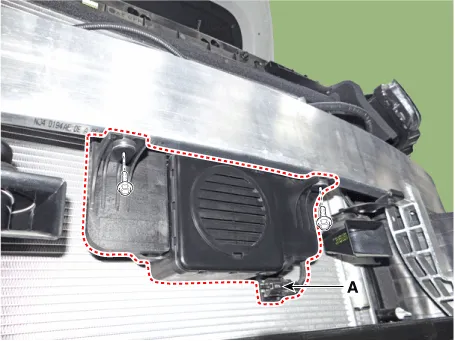
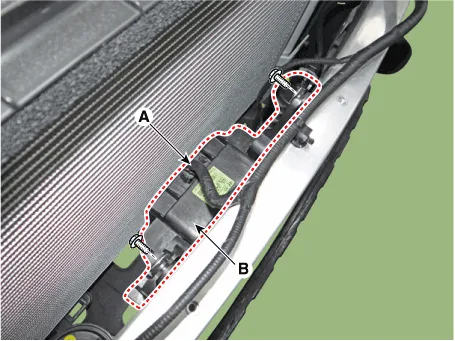
| 3. | Disconnect the VESS speaker connector (A) and then remove the VESS speaker (B) after loosening mounting bolts.
|
| Installation |
| 1. | After connecting the VESS connectors, install the VESS speaker. |
| 2. | After connecting the horn connectors, install both high-pitch and low-pitch horns. |
| 3. | Install the front bumper cover. |
| 4. | Connect the negative (-) battery terminal. |
Other information:
Hyundai Ioniq (AE) 2017-2022 Service & Repair Manual: Evaporator Temperature Sensor. Description and operation
DescriptionThe evaporator temperature sensor will detect the evaporator core temperature and interrupt compressor relay power in order to prevent evaporator from freezing by excessive cooling. The evaporator temperature sensor has the Negative Temperature Coefficient (NTC).
Hyundai Ioniq (AE) 2017-2022 Service & Repair Manual: emperature Control Actuator. Specifications
S
Categories
- Manuals Home
- Hyundai Ioniq Owners Manual
- Hyundai Ioniq Service Manual
- Description and operation
- Front Disc Brake. Repair procedures
- Jump starting procedure
- New on site
- Most important about car

Copyright В© 2026 www.hioniqae.com - 0.0178