
Hyundai Ioniq (AE): VESS(Virtual Engine Sound System) / Virtual Engine Sound Speaker. Schematic diagrams
| SCHEMATIC DIAGRAM |
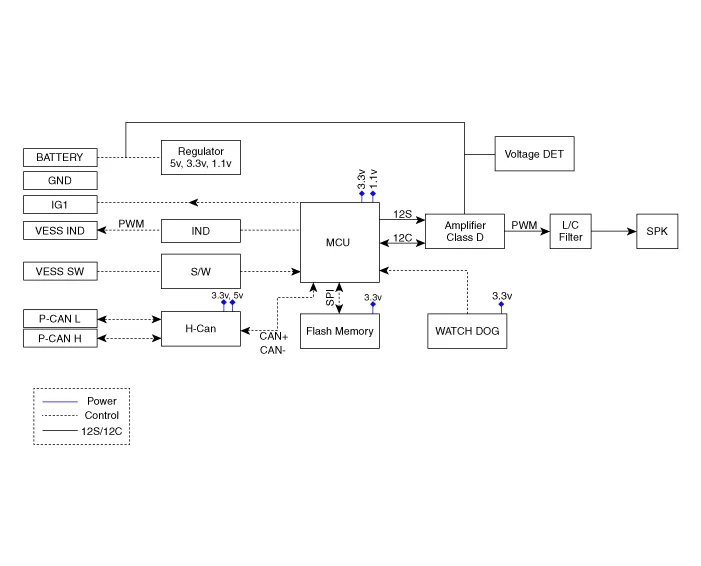
Component Location
Removal1.Disconnect the negative(-) battery terminal.2.Remove the front bumper cover.(Refer to Body - "Front Bumper Cover")3.Disconnect the VESS speaker connector (A) and then remove the VESS speaker (B) after loosening mounting bolts.
Other information:
Hyundai Ioniq (AE) 2017-2022 Service & Repair Manual: Ambient Temperature Sensor. Description and operation
DescriptionThe ambient temperature sensor is located at the front of the condenser and detects ambient air temperature. It is a negative type thermistor; resistance will increase with lower temperature, and decrease with higher temperature.The sensor output will be used for discharge temperature control, temperature regulation door contrl, blower m
Hyundai Ioniq (AE) 2017-2022 Service & Repair Manual: Duct Sensor. Repair procedures
Inspection1.Check that the voltage values of No. 1, 2 duct sensors change1. Sensor (+ 5V)2. Sensor groundSpecification Ambient temperature [°C (°F)] Resistance (kΩ) Voltage (V) 50 (122)1.
Categories
- Manuals Home
- Hyundai Ioniq Owners Manual
- Hyundai Ioniq Service Manual
- Maintenance
- Troubleshooting
- General Information
- New on site
- Most important about car
