
Hyundai Ioniq (AE): Crash Pad / Crash Pad Garnish. Repair procedures
Hyundai Ioniq (AE) 2017-2022 Service & Repair Manual / Body (Interior and Exterior) / Crash Pad / Crash Pad Garnish. Repair procedures
| Replacement |
[Crash pad center garnish]
|

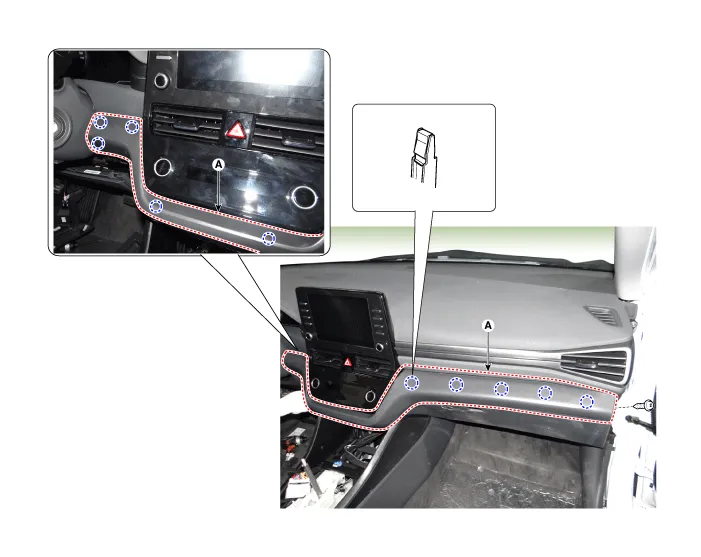
| 1. | Using a remover and remove the crash pad side cover [RH] (A).
|

| 2. | Remove the crash pad lower panel. (Refer to Crash Pad - "Crash Pad Lower Panel") |
| 3. | Loosen the mounting screw and remove the crash pad center garnish (A).
|
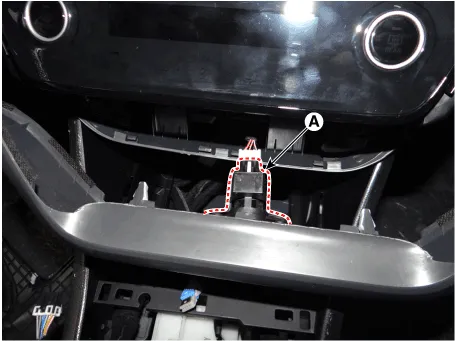
| 4. | Press the lock pin and separate the in-car sensor connector (A).
|
| 5. | To install, reverse the removal procedure.
|

Crash pad garnish [RH]
|
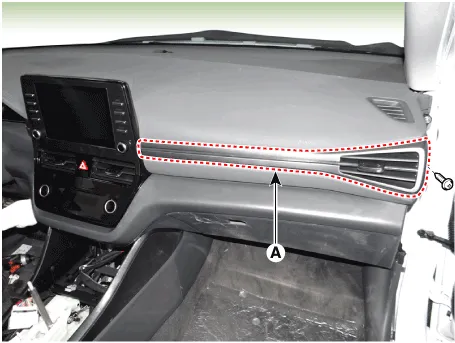
| 1. | Using a remover and remove the crash pad side cover [RH] (A).
|
| 2. | Loosen the mounting screw and remove the crash pad garnish [RH] (A).
|
| 3. | To install, reverse the removal procedure.
|
Component Location 1. Crash pad center garnish2. Crash pad garnish [RH]
Component Location 1. Steering column shroud lower panel2. Steering column shroud upper panel
Other information:
Hyundai Ioniq (AE) 2017-2022 Service & Repair Manual: Heater Core. Repair procedures
Replacement1.Disconnect the negative (-) battery terminal. 2.Remove the heater and blower assembly.(Refer to Heater - "Heater Unit") 3.Loosen the mounting screws and remove the driver's temperature control actuator (A).4.Remove the heater core cover (A) after loosening the mounting screws.
Hyundai Ioniq (AE) 2017-2022 Service & Repair Manual: Intake Actuator. Specifications
S
Categories
- Manuals Home
- Hyundai Ioniq Owners Manual
- Hyundai Ioniq Service Manual
- Fuel Pump Control Module (FPCM). Repair procedures
- Child-Protector Rear Door Locks
- Maintenance
- New on site
- Most important about car

Copyright © 2025 www.hioniqae.com - 0.0144