
Hyundai Ioniq (AE): Hybrid Control System / HPCU (Hybrid Power Control Unit). Repair procedures
| Removal |
|

| 1. | Shut off the high voltage circuit. (Refer to Hybrid Control System - "High Voltage Shutoff Procedure") |
| 2. | Remove the air cleaner assembly and air duct. (Refer to Engine Mechanical System - "Air Cleaner") |
| 3. | Remove the ECM & TCM bracket assembly. (Refer to Engine Control/Fuel System - "Engine Control Module") |
| 4. | Drain the coolant of hybrid motor cooling system. (Refer to Hybrid Motor Cooling System - "Coolant") |
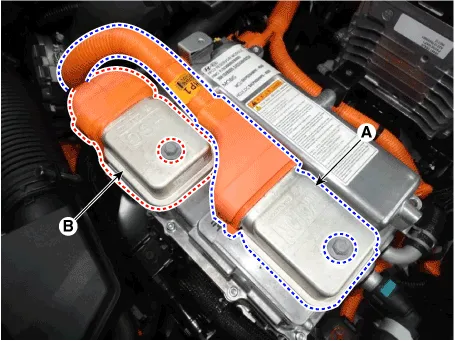
| 5. | Disconnect the motor power cable connector (A) and HSG power cable connector (B) after loosening the mounting bolts.
|
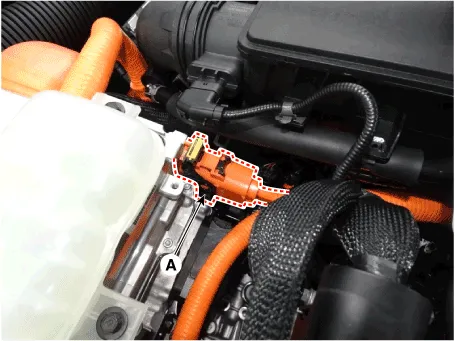
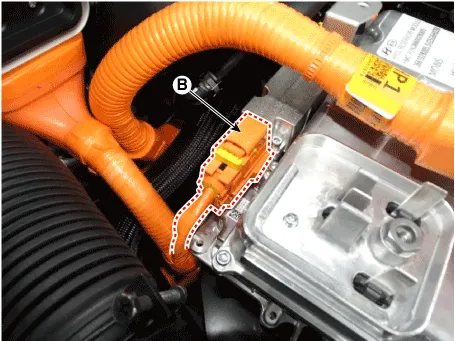
| 6. | Disconnect the power cable (A) and inverter power cable (B) from the HPCU.
|

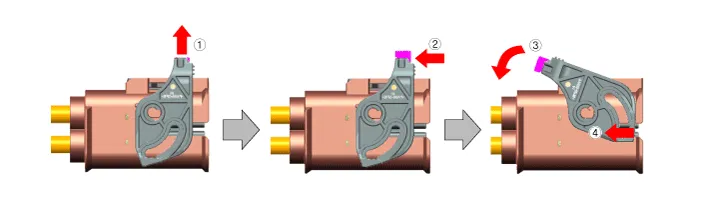
| 7. | Disconnect the HCU & inverter (MCU) connector (A).
|
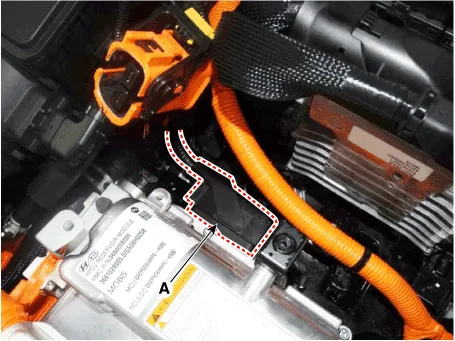
| 8. | Disconnect the coolant outlet hose & pipe after loosening the mounting bolt (A).
|
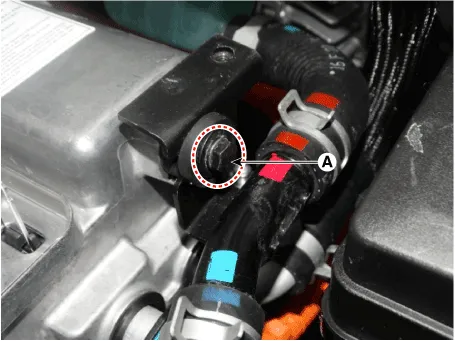
| 9. | Disconnect the coolant inlet hose quick-connector (A). |
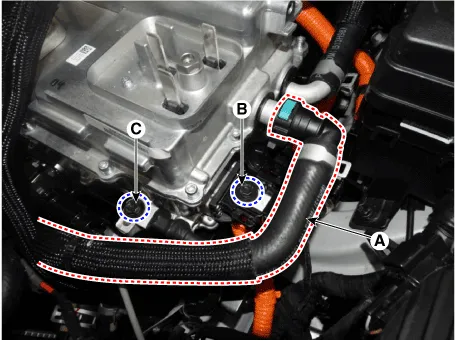
| 10. | Remove the LDC power outlet cable mounting bolt (B) and ground cable bolt (C).
|
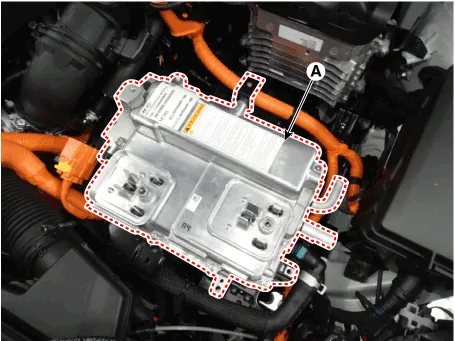
| 11. | Remove the HPCU (A) after loosening the mounting bolts.
|
| Installation |
|
| 1. | Install the HPCU in the reverse order of removal.
|
| 2. | Refill the hybrid motor cooling system coolant and perform air bleeding by using the GDS. (Refer to Hybrid Motor Cooling System - "Coolant")
|

| 1. | Turn the ignition switch OFF. |
| 2. | Connect the KDS / GDS to Data Link Connector (DLC). Turn the ignition switch ON. |
| 3. | Select "Vehicle, Model year, Engine, System". |
| 4. | Select "Vehicle S/W Management". |
| 5. | Select "HCU Variant Coding".
|

| 1. | Turn the ignition switch OFF. |
| 2. | Connect the KDS / GDS to Data Link Connector (DLC). Turn the ignition switch ON. |
| 3. | Select "Vehicle, Model year, Engine, System". |
| 4. | Select "Vehicle S/W Management". |
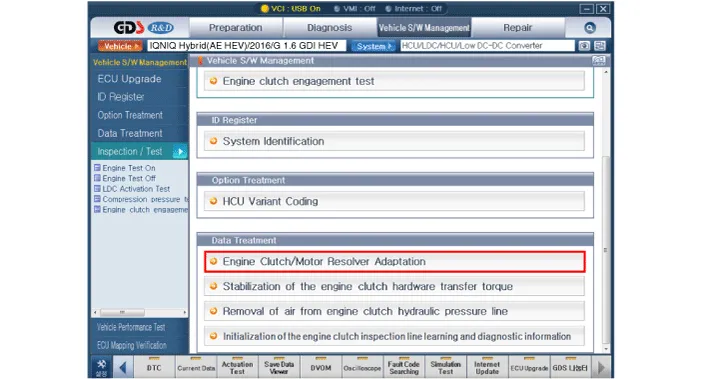
| 5. | Select "Engine clutch/motor resolver adaptation.".
|
Components1. Hybrid Control Unit (HCU)2. Inverter3. Low DC/DC Converter (LDC)4. Connector (↔ High Voltage Battery)5. Connector (↔ Motor)6. Connector (↔ HSG)7.
HCU Terminal and Input / Output SignalTerminal FunctionConnector [C133-S] Pin No Description Connected to 1HCU GroundChassis ground2HCU GroundChassis ground3HCU GroundChassis ground4Battery power (B+)Battery5Battery power (B+)Battery6Battery power (B+)Battery7- 8- 9- 10- 11- 12- 13- 14- 15Brake Switch 2 signal inputBrake Switch (NC, IG1)16Brake Switch 1 signal inputBrake Switch (NO, B+)17- 18- 19- 20- 21- 22- 23- 24- 25- 26- 27- 28- 29- 30- 31-32-33-34- 35- 36- 37- 38Start signal inputSmart Key Unit39- 40- 41- 42- 43- 44- 45- 46- 47- 48- 49- 50- 51- 52- 53- 54- 55- 56- 57- 58- 59- 60- 61- 62- 63- 64- 65- 66- 67- 68- 69- 70- 71- 72- 73IGN signal inputSmart Key Unit74- 75- 76- 77- 78Powertrain CAN [High] signal inputOther control modules79Powertrain CAN [Low] signal inputOther control modules80- 81Hybrid CAN [High] signal inputOther control modules82Hybrid CAN [Low] signal inputOther control modules83- 84- 85- 86- 87- 88- 89- 90- 91- 92- 93- 94- Input/Output signalConnector [C133-S] Pin no Description Condition Type Level 1HCU GroundAlwaysDC VoltageMax.
Other information:
Hyundai Ioniq (AE) 2017-2022 Service & Repair Manual: Repair procedures
Service Point Target Auto Calibration (SPTAC)When you need calibration :– Front view camera is removed and mounted– Replace front view camera with a new one – Windshield glass changed– Front view camera coupler of the windshield glass is deformedService Point T
Hyundai Ioniq (AE) 2017-2022 Service & Repair Manual: Warning Indicator. Repair procedures
RemovalWarning Indicator1.Disconnect the negative (-) battery terminal.2.Remove the mirror (A).InstallationWarning Indicator1.Install the outside mirror.2.Connect the negative (-) battery terminal.Inspection1.Apply battery voltage to each terminal as shown in the table and verify that the mirror operates properly.
Categories
- Manuals Home
- Hyundai Ioniq Owners Manual
- Hyundai Ioniq Service Manual
- If the 12 Volt Battery is Discharged (Hybrid Vehicle)
- Description and operation
- Maintenance
- New on site
- Most important about car
