
Hyundai Ioniq (AE): Indicators And Gauges / Instrument Cluster. Components and components location
| Components |
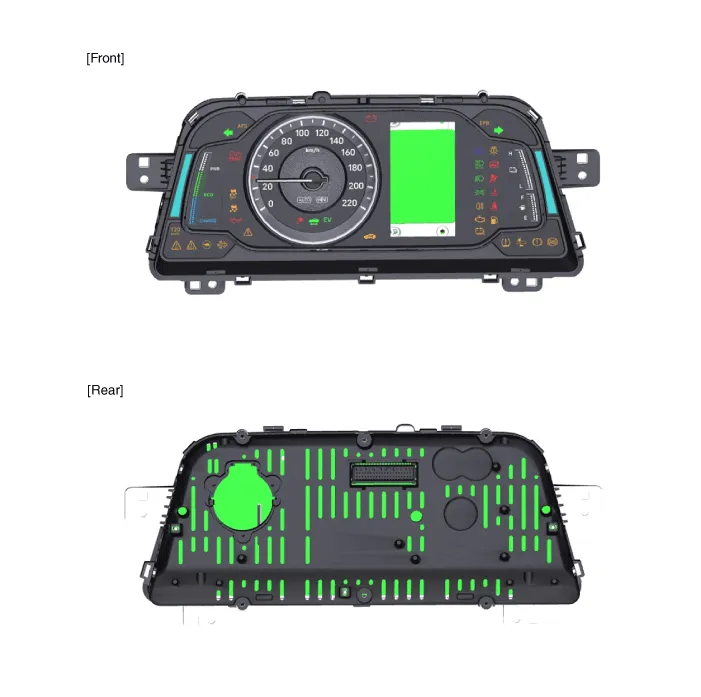
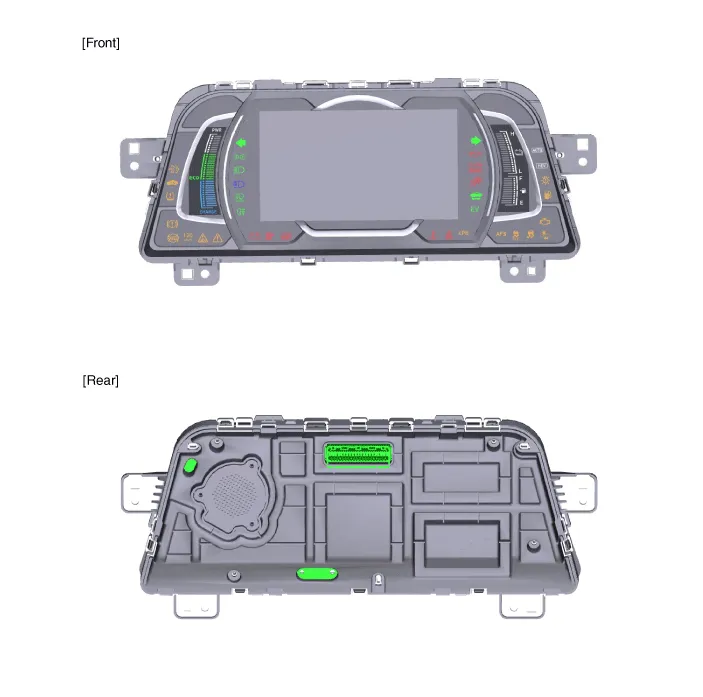
|
No
|
Description
|
No
|
Description
|
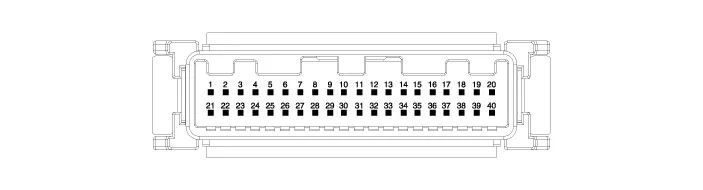
| 1 | Ground | 21 | Trip switch (-) |
| 2 | Illumination (-) | 22 | Trip switch 1 (+) |
| 3 | Rheostat switch (Down) | 23 | Trip switch 2 (+) |
| 4 | Rheostat switch (Up) | 24 | AT ('P' Position) |
| 5 | - | 25 | AT ('R' Position) |
| 6 | Oil press switch input | 26 | AT ('N' Position) |
| 7 | Washer level (Low) | 27 | AT ('D' Position) |
| 8 | - | 28 | AT ('S' Position) |
| 9 | - | 29 | Multimedia - CAN (Low) |
| 10 | Drive mode switch input | 30 | Multimedia - CAN (High) |
| 11 | Detent output | 31 | - |
| 12 | - | 32 | Chassis - CAN (High) |
| 13 | - | 33 | Chassis - CAN (Low) |
| 14 | Fuel sender (+)_Input | 34 | - |
| 15 | - | 35 | - |
| 16 | Fuel sender (-)_Input | 36 | - |
| 17 | Immobillizer input | 37 | Ground |
| 18 | Vehicle speed output | 38 | IGN 3 |
| 19 | Airbag input (+) | 39 | IGN 1 |
| 20 | Tail lamp | 40 | Battery (+) |
Troubleshooting Error Item Failure symptom Inspection items Detailed inspections Relevant Parts/ Components Screen displayTFT-LCD screen does not turn on1)Connector attachments2)Components1)Check the connector attachments2)Check B+, IGN and GND wiring3)Check the components Connectors, wiring, fuses, dashboardWarning lightAirbag warning lamp malfunction1)Connector attachments2)C-CAN3)Components1)Check airbag + signal (connectors)2)Check C-CAN (ACU4) signal3)Check the FPC attachment inside the dashboardACU Connectors, wiring, fuses, dashboardMode conversionIntegrated driving mode malfunction1)Connector attachments2)Switch3)Components1)Check the switch input (connector)2)Check the switch signal input(disconnection or shorting)3)Check conversion with dashboard componentSwitch connector, wiring dashboardIlluminationInterior light brightness cannot be controlled.
DescriptionCommunication Network Diagram Abbreviation Expalnation AAFActive Air FlapACUAirbag Control UnitAEBAutonomous Emergency BrakingAHBActive Hybrid Brake SystemAMPAmplifierAVNHead Unit (Audio / AVN)B_CANBody Controller Area NetworkBCMBody Control ModuleBMSBattery Management SystemBSDBlind Spot DetectionC_CANChassis Controller Area NetworkCARMERARear View CarmeraCLUCluster ModuleDATCDual Automatic Temp ControlFPCMFuel Pump Control ModuleHPCUHybrid Power UnitIGPMIntergrated Gateway & Power control ModuleLDWSLane Departure Warning SystemM_CANMulti media Controller Area NetworkMDPS Motor Driven Power SteeringP_CANPowertrain Controller Area NetworkPASParking Assist SystemSJBSmart Junction BlockSMKSmart Key UnitTCM(DCT)Double Clutch Transmission UnitVESSVirtual Engine Sound SystemCluster Variant CodingAs we have more options (ESC, MDPS, SCC, etc.
Other information:
Hyundai Ioniq (AE) 2017-2022 Service & Repair Manual: Ambient Temperature Sensor. Description and operation
DescriptionThe ambient temperature sensor is located at the front of the condenser and detects ambient air temperature. It is a negative type thermistor; resistance will increase with lower temperature, and decrease with higher temperature.The sensor output will be used for discharge temperature control, temperature regulation door contrl, blower m
Hyundai Ioniq (AE) 2017-2022 Service & Repair Manual: Repair procedures
Self Diagnosis1.Self-diagnosis process. • When operating the self-diagnostics, the below fault (self-diagnostics code) will blink at 0.5 seconds interval on the temperature display settings (driver's side only) and the remaining symbols are OFF .
Categories
- Manuals Home
- Hyundai Ioniq Owners Manual
- Hyundai Ioniq Service Manual
- Engine Clutch System
- Front Disc Brake. Repair procedures
- Maintenance
- New on site
- Most important about car
