
Hyundai Ioniq (AE): Cowl Top Cover / Repair procedures
Hyundai Ioniq (AE) 2017-2022 Service & Repair Manual / Body (Interior and Exterior) / Cowl Top Cover / Repair procedures
| Replacement |
| 1. | Remove the plug hole.
|
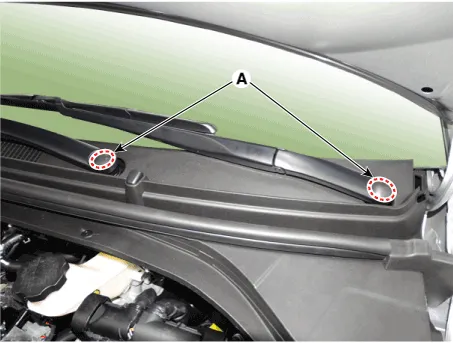
| 2. | Loosen the mounting nuts and remove the wiper arm (A).
|
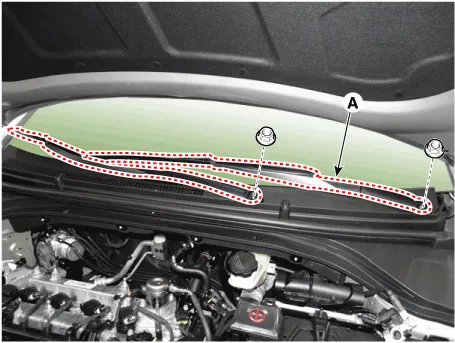
| 3. | Using a screwdriver or remover, remove the cowl side cover (A).
|
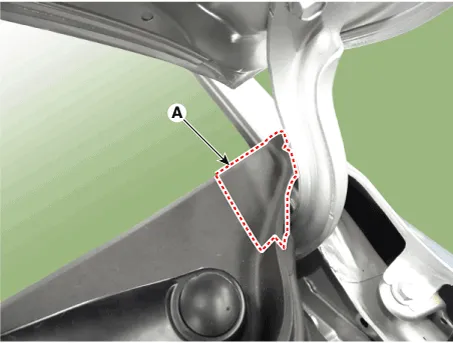
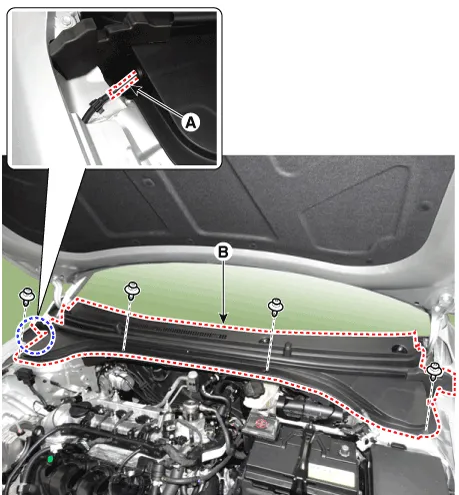
| 4. | Disconnect the washer nozzle (A). |
| 5. | Detach the clips, then remove the cowl top cover (B).
|
| 6. | To install, reverse the removal procedure.
|

Component Location 1. Cowl top cover
Other information:
Hyundai Ioniq (AE) 2017-2022 Service & Repair Manual: Description and operation
DescriptionIn ordinary cars, the mechanical water pump mounted on the engine for heating purposes is activated to circulate the cooling water, but in hybrid cars, AEWP is used to circulate the cooling water when the engine is not operating. Classification System Cooling water used
Hyundai Ioniq (AE) 2017-2022 Service & Repair Manual: Description and operation
Cruise ControlThe cruise control system is engaged by the cruise "ON/OFF" main switch located on right of steering wheel column. The system has the capability to cruise, coast, accelerate and resume speed.It also has a safety interrupt, engaged upon depressing brake or shifting select lever.
Categories
- Manuals Home
- Hyundai Ioniq Owners Manual
- Hyundai Ioniq Service Manual
- Transmission Gear Oil. Repair procedures
- Troubleshooting
- Components and components location
- New on site
- Most important about car

Copyright © 2026 www.hioniqae.com - 0.023