
Hyundai Ioniq (AE): Crash Pad / Crash Pad Garnish. Repair procedures
Hyundai Ioniq (AE) 2017-2022 Service & Repair Manual / Body (Interior and Exterior) / Crash Pad / Crash Pad Garnish. Repair procedures
| Replacement |
[Crash pad center garnish]
|

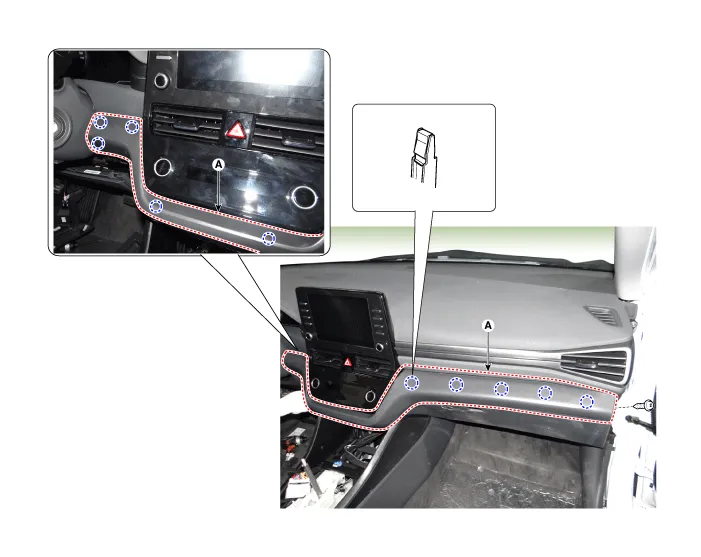
| 1. | Using a remover and remove the crash pad side cover [RH] (A).
|

| 2. | Remove the crash pad lower panel. (Refer to Crash Pad - "Crash Pad Lower Panel") |
| 3. | Loosen the mounting screw and remove the crash pad center garnish (A).
|
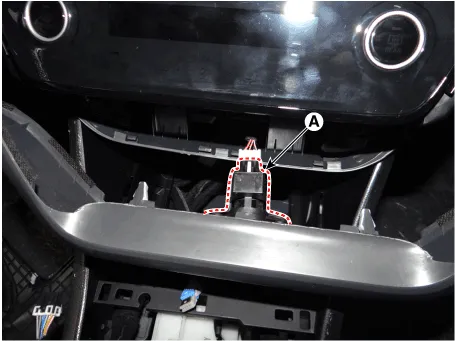
| 4. | Press the lock pin and separate the in-car sensor connector (A).
|
| 5. | To install, reverse the removal procedure.
|

Crash pad garnish [RH]
|
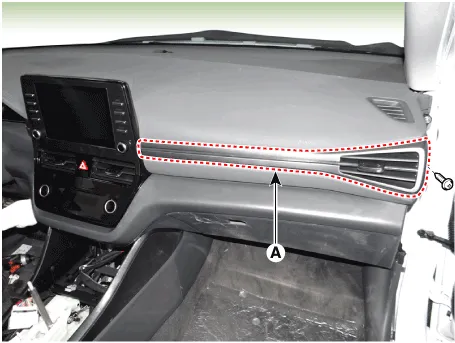
| 1. | Using a remover and remove the crash pad side cover [RH] (A).
|
| 2. | Loosen the mounting screw and remove the crash pad garnish [RH] (A).
|
| 3. | To install, reverse the removal procedure.
|
Component Location 1. Crash pad center garnish2. Crash pad garnish [RH]
Component Location 1. Steering column shroud lower panel2. Steering column shroud upper panel
Other information:
Hyundai Ioniq (AE) 2017-2022 Service & Repair Manual: PTC Heater. Repair procedures
InspectionOperating Logic Test (Manual only)Inspect the PTC operation by confirmation logic as follows.1.Entering(1)Set the Floor mode and maximum heating position.(2)Turn off the blower switch.(3)Press the intake (recirculation) button 5 times or more.
Hyundai Ioniq (AE) 2017-2022 Service & Repair Manual: Description and operation
DescriptionThe smart cruise control system allows a driver to program the vehicle to control the speed and following distance by detecting the vehicle ahead without depressing the brake pedal and the accelerator pedal.1.Cruise speed control : The vehicle maintains the selected speed if there are not vehicles ahead.
Categories
- Manuals Home
- Hyundai Ioniq Owners Manual
- Hyundai Ioniq Service Manual
- Transmission Gear Oil. Repair procedures
- Engine Clutch System
- Engine Mechanical System
- New on site
- Most important about car

Copyright © 2026 www.hioniqae.com - 0.0179