
Hyundai Ioniq (AE): Parking Brake System / Electric Parking Brake (EPB). Repair procedures
| Removal |
| 1. | Turn ignition switch off and disconnect the battery (-) cable from the battery. |
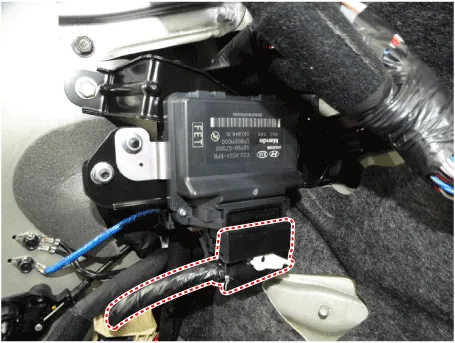
| 2. | Disconnect the EPB control module connector.
|
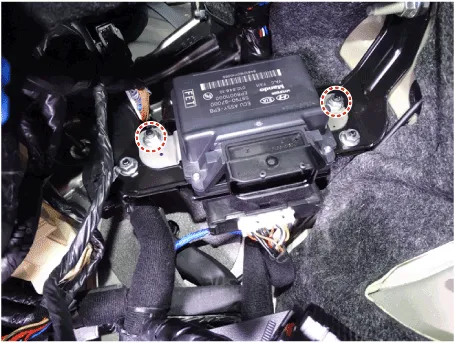
| 3. | Loosen the mounting nuts and then remove the EPB control module.
|
| Installation |
| 1. | Install in the reverse order of removal. |
| 2. | Check that the brake operates normally by pushing the EPB switch more than 3 times after installing the EPB module. |
System Circuit DiagramTerminal Function Pin No Function Pin No Function 1-21-2-22-3- 23C-CAN (Low)4- 24C-CAN (High) 5- 25EPB Switch (SW1)6- 26EPB Switch (SW2)7- 27EPB Switch (SW3)8-28EPB Switch (SW4)9- 29-10- 30- 11- 31- 12- 32- 13- 33ì ‘ì§€ 14- 34ì ‘ì§€15- 35EPB Actuator RH (+)16- 36EPB Actuator LH (-)17IGNITION_137EPB Actuator RH (-)18-38EPB Actuator LH (+)19-39Battary20-40Battary
Other information:
Hyundai Ioniq (AE) 2017-2022 Service & Repair Manual: Duct Sensor. Components and components location
C
Hyundai Ioniq (AE) 2017-2022 Service & Repair Manual: Heater Core. Repair procedures
Replacement1.Disconnect the negative (-) battery terminal. 2.Remove the heater and blower assembly.(Refer to Heater - "Heater Unit") 3.Loosen the mounting screws and remove the driver's temperature control actuator (A).4.Remove the heater core cover (A) after loosening the mounting screws.
Categories
- Manuals Home
- Hyundai Ioniq Owners Manual
- Hyundai Ioniq Service Manual
- Hybrid Vehicle Engine Compartment
- Maintenance
- Description and operation
- New on site
- Most important about car
