
Hyundai Ioniq (AE): AVN System / External AMP. Components and components location
| Components |
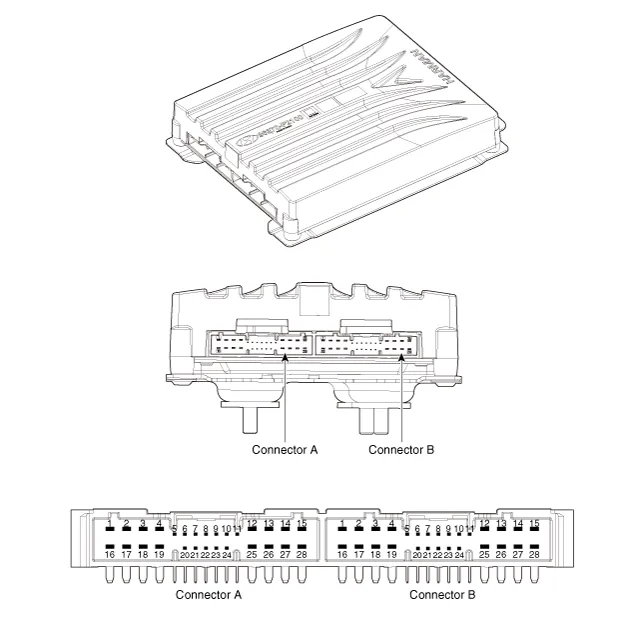
|
NO
|
Connector A
|
NO
|
Connector B
|
| 1 | BATT (+) | 1 | Subwoofer 2 (+) |
| 2 | BATT (+) | 2 | Subwoofer 1 (+) |
| 3 | BATT (+) | 3 | Front door tweeter speaker - RH (+) |
| 4 | BATT (+) | 4 | Front door tweeter speaker - LH (+) |
| 5 | - | 5 | - |
| 6 | Multimedia CAN (High) | 6 | - |
| 7 | Multimedia CAN (Low) | 7 | - |
| 8 | ACC | 8 | - |
| 9 | Navigation voice (+) | 9 | - |
| 10 | - | 10 | - |
| 11 | - | 11 | - |
| 12 | - | 12 | Rear door speaker - RH (+) |
| 13 | - | 13 | Rear door speaker - LH (+) |
| 14 | - | 14 | Center speaker (+) |
| 15 | - | 15 | - |
| 16 | Ground | 16 | Subwoofer 2 (-) |
| 17 | Ground | 17 | Subwoofer 1 (-) |
| 18 | Ground | 18 | Front door tweeter speaker - RH (-) |
| 19 | Ground | 19 | Front door tweeter speaker - LH (-) |
| 20 | SPDIF (High) | 20 | - |
| 21 | SPDIF (Low) | 21 | - |
| 22 | SPDIF GND | 22 | - |
| 23 | Navigation voice (-) | 23 | - |
| 24 | - | 24 | - |
| 25 | - | 25 | Rear door speaker - RH (-) |
| 26 | - | 26 | Rear door speaker - LH (-) |
| 27 | - | 27 | Center speaker (+) |
| 28 | - | 28 | - |
Removal1.Disconnect the negative (-) battery terminal.2.Remove the cluster fascia panal.(Refer to Body - "Center Fascia Panal")3.Remove the crash pad garnish RH.
Removal1.Disconnect the negative (-) battery terminal.2.Open the trunk, remove the right luggage side trim.(Refer to Body - "Luggage Side Trim")3.Remove the external amplifier after disconneting the connector (A) and loosening the mounting nuts.
Other information:
Hyundai Ioniq (AE) 2017-2022 Service & Repair Manual: Auto Defoging Actuator. Repair procedures
Inspection1.Turn the ignition switch OFF. 2.Disconnect the auto defogging connector. 3.Verify that the auto defogging actuator operates to the open position when connecting 12V to terminal 3 and grounding terminal 4. Verify that the auto defogging actuator operates to the close position when connected in reverse.
Hyundai Ioniq (AE) 2017-2022 Service & Repair Manual: Rear Corner Safety ON/OFF Switch. Repair procedures
Inspection1.Disconnect the negative (-) battery terminal.2.Remove the crash pad lower panel.(Refer to Body - "Crash Pad Lower Panel")3.Remove the lower crash pad switch assembly (A) after disengaging the mounting clip.4.Remove the rheostat switch connector (A).
Categories
- Manuals Home
- Hyundai Ioniq Owners Manual
- Hyundai Ioniq Service Manual
- Description and operation
- Suspension System
- If the 12 Volt Battery is Discharged (Hybrid Vehicle)
- New on site
- Most important about car
