
Hyundai Ioniq (AE): SRSCM / Front Impact Sensor (FIS). Repair procedures
Hyundai Ioniq (AE) 2017-2022 Service & Repair Manual / Restraint / SRSCM / Front Impact Sensor (FIS). Repair procedures
| Removal |
|

| 1. | Disconnect the battery negative cable, and wait for at least three minutes before beginning work. |
| 2. | Disconnect the front impact sensor connector (A).
|
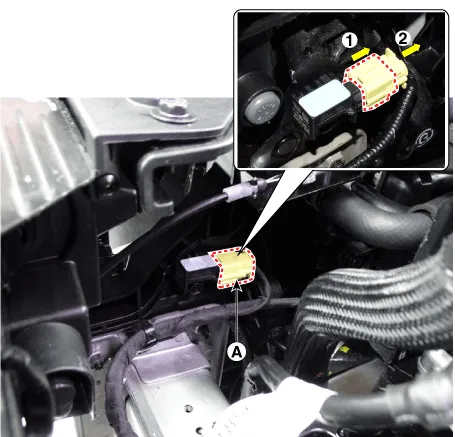
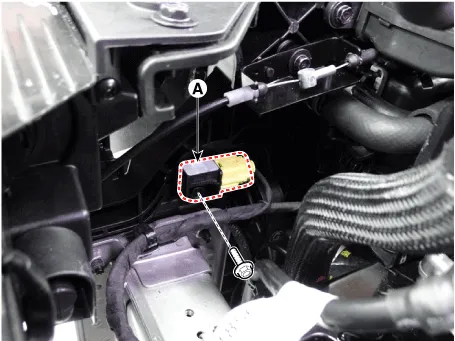
| 3. | Remove the front impact sensor (A) after loosening the mounting bolt.
|
| Installation |
|
| 1. | Install the new front impact sensor. |
| 2. | Connect the front impact sensor connector. |
| 3. | Install the front impact sensor mounting bolt.
|
| 4. | Reconnect the battery negative cable. |
| 5. | After installing the Front Impact Sensor, confirm proper system operation :
|
Components1. Front right Impact Sensor (FIS)2. Front left Impact Sensor (FIS)
Description• Side Impact Sensors (SIS), each installed on the center part of the right and left front door modules and the right and left center pillars, detects side impact during collision.
Other information:
Hyundai Ioniq (AE) 2017-2022 Service & Repair Manual: Auto Defogging Sensor. Repair procedures
Diagnosis With GDS1.The heating, ventilation and air conditioning can be quickly diagnosed failed parts with vehicle diagnostic system (GDS).※ The diagnostic system (GDS) provides the following information.(1) Self diagnosis : Checking the failure code (DTC) and display.
Hyundai Ioniq (AE) 2017-2022 Service & Repair Manual: Intake Actuator. Components and components location
C
Categories
- Manuals Home
- Hyundai Ioniq Owners Manual
- Hyundai Ioniq Service Manual
- Components and components location
- If the 12 Volt Battery is Discharged (Hybrid Vehicle)
- Suspension System
- New on site
- Most important about car

Copyright © 2026 www.hioniqae.com - 0.0178