
Hyundai Ioniq (AE): Exterior Lights / High beam operation
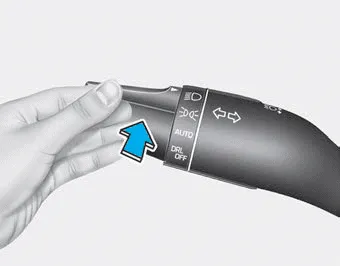
To turn on the high beam headlamp, push the lever away from you. The lever will return to its original position.
The high beam indicator will light when the headlamp high beams are switched on.
To turn off the high beam headlamp, pull the lever towards you. The low beams will turn on.
WARNING
Do not use high beam when there are other vehicles approaching you. Using high beam could obstruct the other driver's vision.
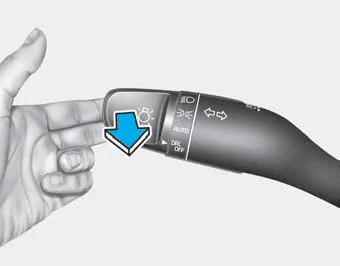
To flash the high beam headlamp, pull the lever towards you, then release the lever. The high beams will remain ON as long as you hold the lever towards you.
To operate the lights, turn the knob at the end of the control lever to one of the following positions: 1. DRL (Daytime Running Lights) OFF position 2.
The High Beam Assist (HBA) is a system that automatically adjusts the headlamp range (switches between high beam and low beam) according to the brightness of other vehicles and road conditions.
Other information:
Hyundai Ioniq (AE) 2017-2022 Service & Repair Manual: Ambient Temperature Sensor. Components and components location
C
Hyundai Ioniq (AE) 2017-2022 Service & Repair Manual: High voltage shut-off procedures
High Voltage Shut-off Procedures • Be sure to read and follow the "General Safety Information and Caution" before doing any work related with the high voltage system. Failure to follow the safety instructions may result in serious electrical injuries.
Categories
- Manuals Home
- Hyundai Ioniq Owners Manual
- Hyundai Ioniq Service Manual
- If the 12 Volt Battery is Discharged (Hybrid Vehicle)
- Jump starting procedure
- Components and components location
- New on site
- Most important about car
