
Hyundai Ioniq (AE): AVN System / Mic. Repair procedures
Hyundai Ioniq (AE) 2017-2022 Service & Repair Manual / Body Electrical System / AVN System / Mic. Repair procedures
| Inspection |
| 1. | Disconnector the negative (-) battery terminal. |
| 2. | Remove the overhead console lamp. (Refer to Body Electrical System - "Overhead Console Lamp") |
| 3. | Remove the overhead console cover after loosening the screws.
|
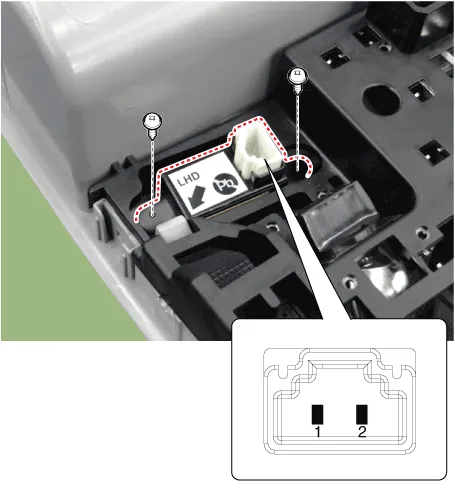
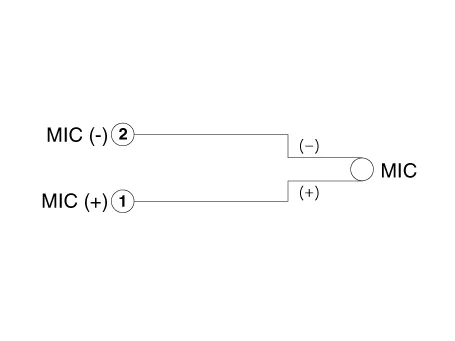
| 4. | Check the continuity of between terminals.
|
Removal1.Disconnect the battery (-) terminals.2.Remove the floor console assembly.(Refer to Body - "Floor Console Assembly")3.Remove the multimedia jack (A) from the console under cover after releasing the fixed hooks (B).
Other information:
Hyundai Ioniq (AE) 2017-2022 Service & Repair Manual: Photo Sensor. Description and operation
Description The photo sensor is located at the center of the defrost nozzles.The photo sensor contains a photovoltaic (sensitive to sunlight) diode. The solar radiation received by its light receiving portion, generates an electromotive force in proportion to the amount of radiation received which is transferred to the automatic temperature control
Hyundai Ioniq (AE) 2017-2022 Service & Repair Manual: Auto Defoging Actuator. Components and components location
C
Categories
- Manuals Home
- Hyundai Ioniq Owners Manual
- Hyundai Ioniq Service Manual
- Components and components location
- Maintenance
- Suspension System
- New on site
- Most important about car

Copyright В© 2026 www.hioniqae.com - 0.0137