
Hyundai Ioniq (AE): Interior Features / Power Outlet
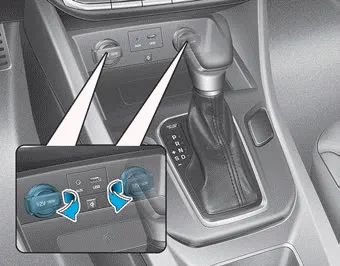
The power outlet is designed to provide power for mobile telephones or other
devices designed to operate with vehicle electrical systems. The devices should
draw less than 180 W (Watts) with the vehicle in the ready ( )
mode.
)
mode.
WARNING
Avoid electrical shocks. Do not place your fingers or foreign objects (pin, etc.) into a power outlet or touch the power outlet with a wet hand.
NOTICE
To prevent damage to the Power Outlets :
- Use the power outlet only when the vehicle is in the ready ( ) mode and remove the accessory plug after use. Using the accessory plug for prolonged periods of time with the vehicle off could cause the battery to discharge.
- Only use 12V electric accessories which are less than 180 W (Watts) in electric capacity.
- Adjust the air-conditioner or heater to the lowest operating level when using the power outlet.
- Close the cover when not in use.
- Some electronic devices can cause electronic interference when plugged into a vehicle’s power outlet.These devices may cause excessive audio static and malfunctions in other electronic systems or devices used in your vehicle.
- Push the plug in as far as it will go. If good contact is not made, the plug may overheat and the fuse may open.
- Plug in battery equipped electrical/ electronic devices with reverse current protection. The current from the battery may flow into the vehicle’s electrical/ electronic system and cause system malfunction.
To use a sunvisor, pull it downward. To use a sunvisor for a side window, pull it downward, unsnap it from the bracket (1) and swing it to the side (2).
The USB charger is located inside the console box between the driver's seat and the front passenger's seat. Insert the USB charger into the USB port, and re-charge a smart phone or a tablet PC.
Other information:
Hyundai Ioniq (AE) 2017-2022 Service & Repair Manual: Heater Unit. Repair procedures
Replacement When prying with a flat-tip screwdriver or use a prying trim tool, wrap it with protective tape, and apply protective tape around the related parts, to prevent damage.1.Disconnect the negative (-) battery terminal.2.Recover the refrigerant with a recovery / recycling / charging station.
Hyundai Ioniq (AE) 2017-2022 Service & Repair Manual: Components and components location
C
Categories
- Manuals Home
- Hyundai Ioniq Owners Manual
- Hyundai Ioniq Service Manual
- Maintenance
- Engine Clutch System
- Transmission Gear Oil. Repair procedures
- New on site
- Most important about car
