
Hyundai Ioniq (AE): AVN System / AVN(Audio Video Navigation) head unit. Components and components location
| Components |
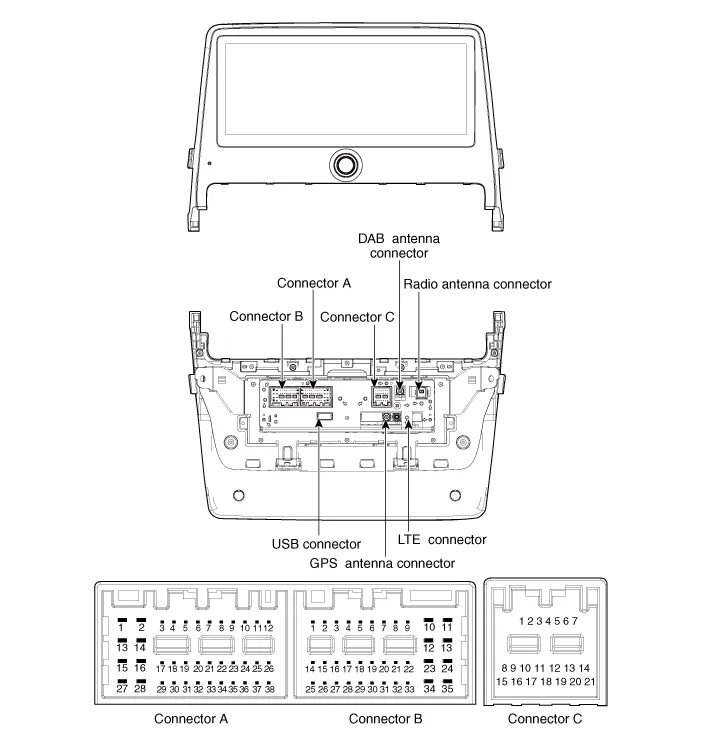

|
No
|
Connector A
|
Connector B
|
Connector C
|
| 1 | - | - | B CAN (High) |
| 2 | - | Mic signal (+) | P CAN (High) |
| 3 | AMP NAVI VOICE (+) | - | IGN3 Wake up |
| 4 | AM SPDIF (High) | - | - |
| 5 | - | Antenna power | - |
| 6 | Camera power | Illumination (+) | - |
| 7 | Camera Video | MM Can (High) | - |
| 8 | - | - | B CAN (Low) |
| 9 | - | - | P CAN (Low) |
| 10 | - | Battery (+) | - |
| 11 | DTC | Battery (+) | - |
| 12 | Steering wheel remote control | Ground | - |
| 13 | - | Ground | - |
| 14 | - | - | - |
| 15 | - | Mic signal (-) | - |
| 16 | - | - | - |
| 17 | AMP NAVI VOICE (-) | - | - |
| 18 | AMP SPDIF (Low) | - | - |
| 19 | AMP SPDIF Ground | Illumination (-) | - |
| 20 | Camera power ground | MM Can (Low) | - |
| 21 | Camera video ground | - | - |
| 22 | - | ACC | |
| 23 | - | - | |
| 24 | - | - | |
| 25 | - | - | |
| 26 | Steering wheel remote constrol ground | - | |
| 27 | - | - | |
| 28 | - | - | |
| 29 | - | - | |
| 30 | - | - | |
| 31 | - | - | |
| 32 | - | - | |
| 33 | Camera shield ground | IGN 1 | |
| 34 | - | - | |
| 35 | - | - | |
| 36 | - | ||
| 37 | - | ||
| 38 | Speed |
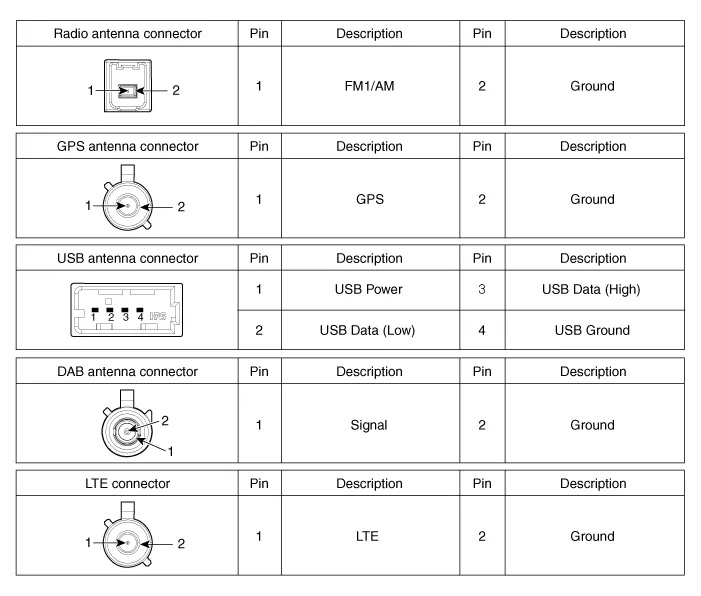
DescriptionAVN SystemThe AVN system has improved information search and easiness of manipulation for the driver by simplifying the system operation experience and unifying the display of the user information such as multimedia and car information.
Removal1.Disconnect the negative (-) battery terminal.2.Remove the cluster fascia panal.(Refer to Body - "Center Fascia Panal")3.Remove the crash pad garnish RH.
Other information:
Hyundai Ioniq (AE) 2017-2022 Service & Repair Manual: PTC Heater. Description and operation
DescriptionThe PTC (Positive Temperature Coefficient) heater is installed at the exit or the backside of the heater core.The PTC heater is an electric heater using a PTC element as an auxiliary heating device that supplements deficiency of interior heat source in highly effective hybrid engine.
Hyundai Ioniq (AE) 2017-2022 Service & Repair Manual: Intake Actuator. Repair procedures
Inspection1.Turn the ignition switch OFF.2.Disconnect the intake actuator connector.3.Verify that the intake actuator operates to the fresh position when connecting 12V to terminal 3 and grounding terminal 4.Verify that the intake actuator operates to the recirculation position when connected in reverse.
Categories
- Manuals Home
- Hyundai Ioniq Owners Manual
- Hyundai Ioniq Service Manual
- Brake System
- Engine Clutch System
- Engine Mechanical System
- New on site
- Most important about car
