
Hyundai Ioniq (AE): AVN System / External AMP. Repair procedures
| Removal |
| 1. | Disconnect the negative (-) battery terminal. |
| 2. | Open the trunk, remove the right luggage side trim. (Refer to Body - "Luggage Side Trim") |
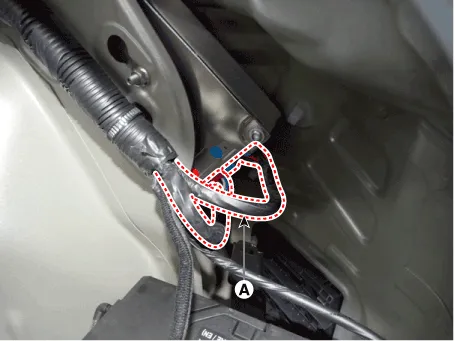
| 3. | Remove the external amplifier after disconneting the connector (A) and loosening the mounting nuts.
|

| Installation |
| 1. | Install the external amplifier after connecting the connector. |
| 2. | Install the right luggage side trim. |
| 3. | Connect the negative (-) battery terminal.
|

Components NO Connector A NO Connector B 1BATT (+)1Subwoofer 2 (+)2BATT (+)2Subwoofer 1 (+)3BATT (+)3Front door tweeter speaker - RH (+)4BATT (+)4Front door tweeter speaker - LH (+)5-5-6Multimedia CAN (High)6-7Multimedia CAN (Low)7-8ACC8-9Navigation voice (+)9-10-10-11-11-12-12Rear door speaker - RH (+)13-13Rear door speaker - LH (+)14-14Center speaker (+)15-15 -16Ground16Subwoofer 2 (-)17Ground17Subwoofer 1 (-)18Ground18Front door tweeter speaker - RH (-) 19Ground19Front door tweeter speaker - LH (-)20SPDIF (High)20-21SPDIF (Low)21-22SPDIF GND22-23Navigation voice (-)23-24-24-25-25Rear door speaker - RH (-)26-26Rear door speaker - LH (-) 27-27Center speaker (+)28-28 -
Components1. Left Remote Control Switch (Audio + Hands free)2. Right Remote Control Switch(Cruise+Trip Computer)
Other information:
Hyundai Ioniq (AE) 2017-2022 Service & Repair Manual: Front View Camera Unit. Repair procedures
Removal1.Disconnect the negative (-) battery terminal.2.Remove the front view camera cover (A).3.Disconnect the front view camera connector (A).4.Remove the front view camera after disengaging the mounting bracket (A).Installation1.Align front view camera with windshield bracket using forward edge point (A).
Hyundai Ioniq (AE) 2017-2022 Service & Repair Manual: General safety information and caution
General Safety Information and CautionBe careful of the following precautions when driving the vehicle using the smart cruise control system. • The smart cruise control system may have limits in detecting distance to the vehicle ahead due to road and traffic conditions.
Categories
- Manuals Home
- Hyundai Ioniq Owners Manual
- Hyundai Ioniq Service Manual
- Jump starting procedure
- If the 12 Volt Battery is Discharged (Hybrid Vehicle)
- Hybrid Control System
- New on site
- Most important about car
