
Hyundai Ioniq (AE): Heated Steering wheel / Repair procedures
| Removal |
| 1. | Disconnect the negative (-) battery terminal. |
| 2. | Remove the glove box. (Refer to Body - "Glove Box Upper Cover Assembly") |
| 3. | Remove the smart key unit. (Refer to Body - "Smart Key Unit") |
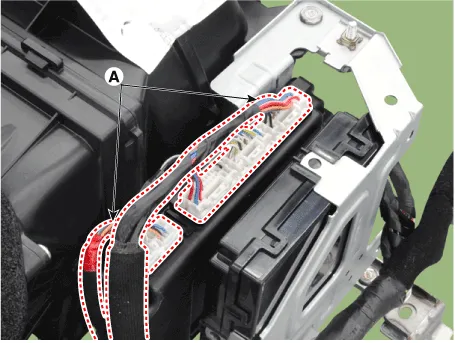
| 4. | Disconnect the body control module connectors (A).
|
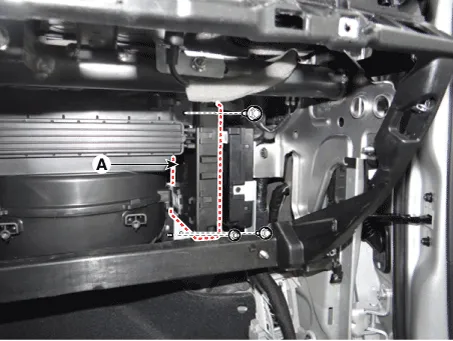
| 5. | Remove the body control module (A) after loosening the mounting nuts.
|
| 6. | Install in the reverse order of removal. |
| Heated steering wheel switch |
| 1. | Disconnect the negative (-) battery terminal. |
| 2. | Remove the floor console upper complete assembly. (Refer to Body - "Floor Console Assembly") |
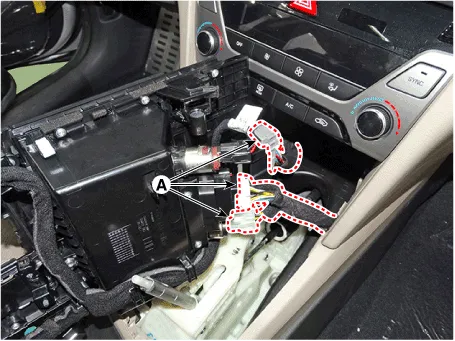
| 3. | Disconnect the connector (A).
|
| 4. | Install in the reverse order of removal. |
| Inpection |
| 1. | Measure a resistance of NTC and Heated pad.
|
| 2. | Measure a temperature.
|
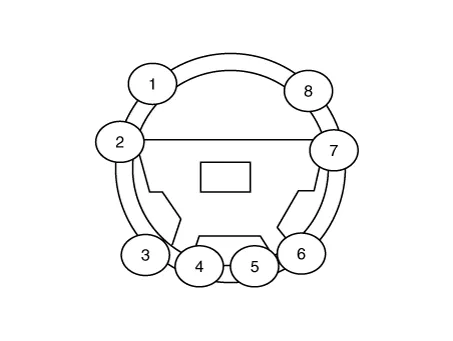
System Circuit DiagramBody control ModuleHeated steering switchHeated steering padTermainal functionBody control module Pin Function D3Ignition 2_Heated handle powerD4Ignition 2_Heated handle power_2D5Heated handleC22NTC (-)C9NTC (+)C4Heated handle switchHeated steering wheel pad Housing Pin Function Wire color PadAGroundBLACKBHEATERYELLOWCNTC+GRAYDNTC-BLACKHeated steering wheel switch Pin Function 7Wheel heated12Wheel heated IND.
Other information:
Hyundai Ioniq (AE) 2017-2022 Service & Repair Manual: Description and operation
System OverviewParking Distance Warning (PDW) is an electronic driving aid that warns the driver to be cautious while parking or driving at low speed. The sensor uses ultrasonic waves to detect objects within proximity of the vehicle.PDW consists of four RPS sensors which are detecting the obstacles and transmit the result separated into three war
Hyundai Ioniq (AE) 2017-2022 Service & Repair Manual: Description and operation
Cruise ControlThe cruise control system is engaged by the cruise "ON/OFF" main switch located on right of steering wheel column. The system has the capability to cruise, coast, accelerate and resume speed.It also has a safety interrupt, engaged upon depressing brake or shifting select lever.
Categories
- Manuals Home
- Hyundai Ioniq Owners Manual
- Hyundai Ioniq Service Manual
- Maintenance
- Front Disc Brake. Repair procedures
- Engine Clutch System
- New on site
- Most important about car
