
Hyundai Ioniq (AE): Manual Heating and Air Conditioning / Sync button
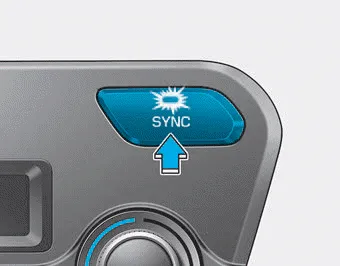
Adjusting the driver and passenger side temperature equally
- Press the "SYNC" button to operate the driver and passenger side temperature equally. The passenger side temperature will be set to the same temperature as the driver side temperature.
- Turn the left temperature control knob. The driver and passenger side temperature will be adjusted equally.
Adjusting the driver and passenger side temperature individually
Press the "SYNC" button again to operate the driver and passenger side temperature individually. The button indicator will turn off.
Turn the knob to the right to increase the temperature. Turn the knob to the left to decrease temperature. The temperature will increase or decrease by 1°F/0.
This button is used to select the outside (fresh) air position or recirculated air position. Recirculated air position With the recirculated air position selected, air from the passenger compartment will be drawn through the heating system and heated or cooled according to the function selected.
Other information:
Hyundai Ioniq (AE) 2017-2022 Service & Repair Manual: emperature Control Actuator. Description and operation
DescriptionThe temperature control actuator is located at the heater unit. It regulates the temperature by the procedure as follows. The signal from the control unit adjusts the position of the temperature door by operating the temperature switch. Then the temperature will be regulated by the hot/cold air ratio decided by the position of the temper
Hyundai Ioniq (AE) 2017-2022 Service & Repair Manual: Auto Defoging Actuator. Repair procedures
Inspection1.Turn the ignition switch OFF. 2.Disconnect the auto defogging connector. 3.Verify that the auto defogging actuator operates to the open position when connecting 12V to terminal 3 and grounding terminal 4. Verify that the auto defogging actuator operates to the close position when connected in reverse.
Categories
- Manuals Home
- Hyundai Ioniq Owners Manual
- Hyundai Ioniq Service Manual
- Jump starting procedure
- Engine Mechanical System
- Front Disc Brake. Repair procedures
- New on site
- Most important about car
