
Hyundai Ioniq (AE): AVN System / USB Jack. Repair procedures
| Removal |
| 1. | Disconnect the battery (-) terminals. |
| 2. | Remove the floor console assembly. (Refer to Body - "Floor Console Assembly") |
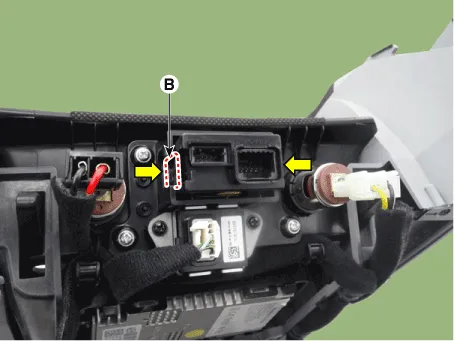
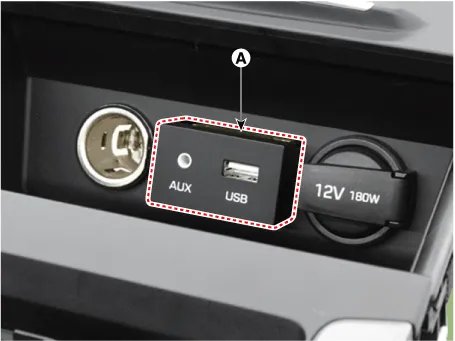
| 3. | Remove the multimedia jack (A) from the console under cover after releasing the fixed hooks (B).
|
| Installation |
| 1. | Connect the multimedia jack connector. |
| 2. | Install the multimedia jack. |
| 3. | Install the floor console assembly. |
DescriptionThe multimedia jack on the console upper cover is for customers who like to listen to external portable music players like the MP3 etc., through the vehicle's sound system when it is linked to this jack.
Inspection1.Disconnector the negative (-) battery terminal.2.Remove the overhead console lamp.(Refer to Body Electrical System - "Overhead Console Lamp")3.
Other information:
Hyundai Ioniq (AE) 2017-2022 Service & Repair Manual: Schematic diagrams
Trouble Symptom ChartsComponent Parts and Function Outline Component part Function Cruise Control Switch Input the set speed and distance to the SCC ECU. Instrument Cluster Display various information inputted from SCC.
Hyundai Ioniq (AE) 2017-2022 Service & Repair Manual: Front Radar Unit. Repair procedures
Removal1.Remove the front bumper.(Refer to Body - "Front Bumper")2.Disconnect the smart cruise control unit connector (A).3.Remove the smart cruise control nuit assembly (B) from thevehicle after loosening mounting bolts.Installation1.Install in the reverse order of removal.
Categories
- Manuals Home
- Hyundai Ioniq Owners Manual
- Hyundai Ioniq Service Manual
- Components and components location
- Repair procedures
- Jump starting procedure
- New on site
- Most important about car
