
Hyundai Ioniq (AE): AVN System / USB Jack. Description and operation
| Description |
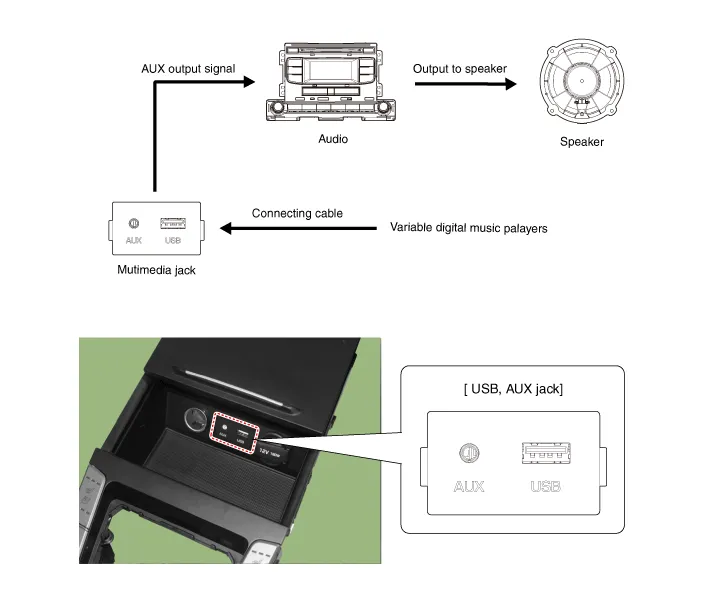
Circuit Diagram
Removal1.Disconnect the battery (-) terminals.2.Remove the floor console assembly.(Refer to Body - "Floor Console Assembly")3.Remove the multimedia jack (A) from the console under cover after releasing the fixed hooks (B).
Other information:
Hyundai Ioniq (AE) 2017-2022 Service & Repair Manual: In-car Sensor. Repair procedures
Diagnosis With GDS1.The heating, ventilation and air conditioning can be quickly diagnosed failed parts with vehicle diagnostic system (GDS).※ The diagnostic system (GDS) provides the following information.(1) Self diagnosis : Checking the failure code (DTC) and display.
Hyundai Ioniq (AE) 2017-2022 Service & Repair Manual: Repair procedures
Removal1.Disconnect the negative (-) battery terminal.2.Remove the tailgate lid trim.(Refer to Body - "TailGate Lid Trim")3.Disconnect the Rear view camera connector (A).4.Remove the Rear view camera assembly after loosening the mounting screws.Installation1.
Categories
- Manuals Home
- Hyundai Ioniq Owners Manual
- Hyundai Ioniq Service Manual
- Front Disc Brake. Repair procedures
- Engine Clutch System
- Transmission Gear Oil. Repair procedures
- New on site
- Most important about car
