
Hyundai Ioniq (AE): Power Windows / Power Window Motor. Repair procedures
Hyundai Ioniq (AE) 2017-2022 Service & Repair Manual / Body Electrical System / Power Windows / Power Window Motor. Repair procedures
| Inspection |
|

Front Power Window Motor
| 1. | Disconnect the negative (-) battery terminal. |
| 2. | Remove the front door trim. (Refer to Body - "Front Door Trim") |
| 3. | Disconnect the motor connector from the motor.
|
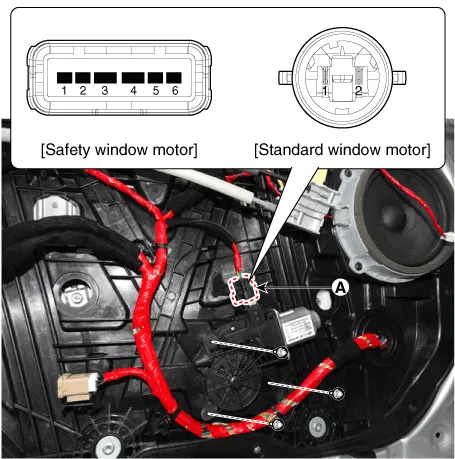
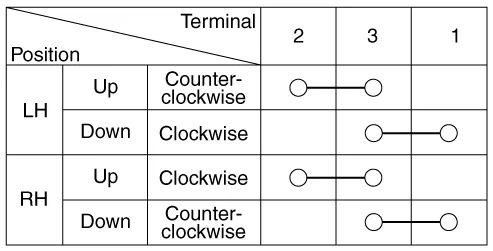
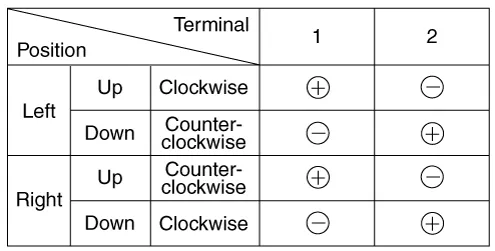
| 4. | Connect the terminal No.1 and No.2 to battery voltage (12V) and check that the motor operates smoothly when connecting the terminals below. [Safety Window Motor]
|
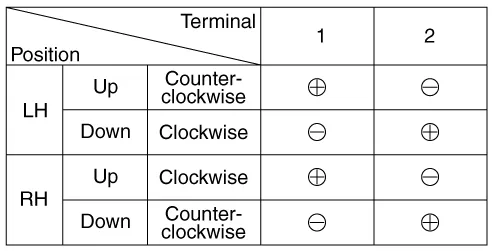
| 5. | Connect the motor terminals directly to battery voltage (12V) and check that the motor operates smoothly. Next, reverse the polarity and check that the motor operates smoothly in the reverse direction. If the operation is abnormal, replace the motor. [Standard Window Motor]
|
Rear Power Window Motor
| 1. | Disconnect the negative (-) battery terminal. |
| 2. | Remove the rear door trim. (Refer to Body - "Rear Door Trim") |
| 3. | Disconnect the motor connector from the motor.
|
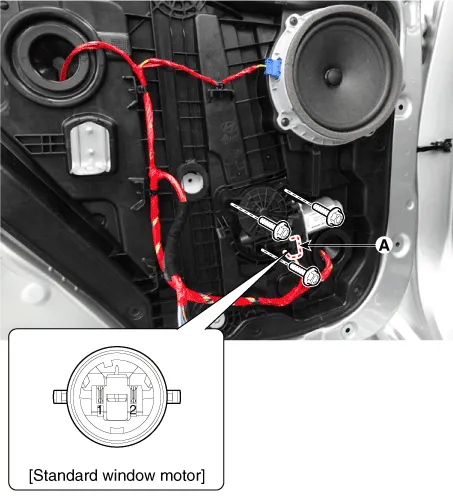
| 4. | Connect the motor terminals No.1 and No.2 directly to battery voltage (12V) and check that the motor operates smoothly. If the operation is abnormal, replace the motor. [Safety Window Motor]
|
Circuit Diagram
ComponentsDriver Power Window SwitchAssist Power Window SwitchRear Power Window Switch
Other information:
Hyundai Ioniq (AE) 2017-2022 Service & Repair Manual: Description and operation
DescriptionBlcok DiagramFunctions of Front View CameraFront View Camera supports the following functions using the information (lane, light source, vehicle and pedestrian) detected by the front view camera and the vehicle's signal information (CAN communication).
Hyundai Ioniq (AE) 2017-2022 Service & Repair Manual: Components and components location
C
Categories
- Manuals Home
- Hyundai Ioniq Owners Manual
- Hyundai Ioniq Service Manual
- Maintenance
- Front Disc Brake. Repair procedures
- Engine Control/Fuel System
- New on site
- Most important about car

Copyright © 2026 www.hioniqae.com - 0.0171