
Hyundai Ioniq (AE): Fender / Repair procedures
Hyundai Ioniq (AE) 2017-2022 Service & Repair Manual / Body (Interior and Exterior) / Fender / Repair procedures
| Replacement |
|

|

| 1. | Remove the front bumper. (Refer to Front Bumper - "Front Bumper Cover") |
| 2. | Remove the head lamps. (Refer to Body Electrical System - "Head Lamps") |
| 3. | Remove the front wheel guard. (Refer to Body Side Molding - "Front Wheel Guard") |
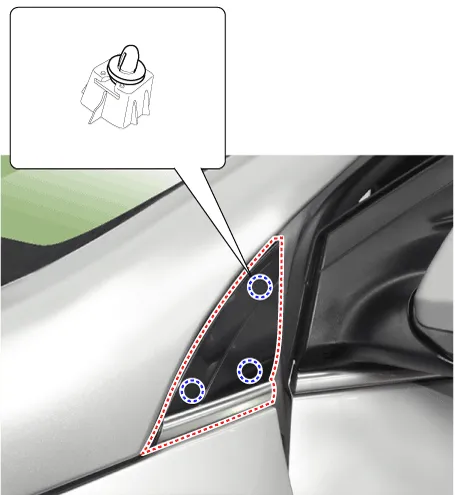
| 4. | Using a screwdriver or remover, remove the delta garnish (A).
|
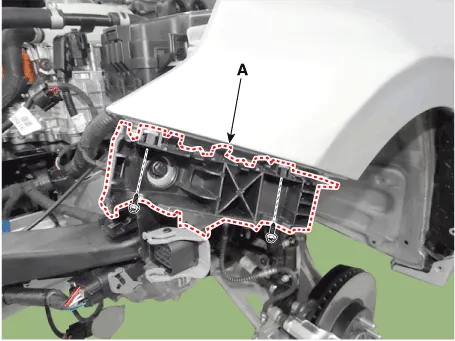
| 5. | Remove the front bumper side mounthing bracket (A) after loosening the bolts.
|
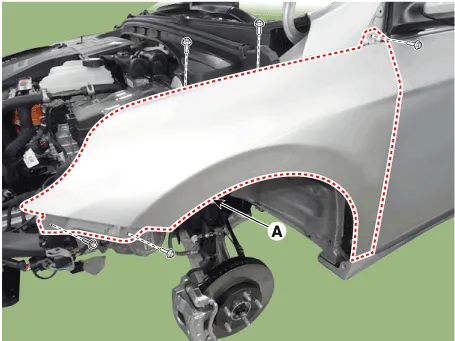
| 6. | After loosening the mounting bolts, remove the fender assembly (A).
|
| 7. | To install, reverse the removal procedure.
|
Component Location1. Fender assembly
Other information:
Hyundai Ioniq (AE) 2017-2022 Service & Repair Manual: Photo Sensor. Repair procedures
Inspection1.Turn the ignition switch ON.2.Connect the GDS.3.Emit intensive light toward the photo sensor using a lamp, and check the output voltage change.4.The voltage will rise with higher intensive light and reduce with lower intensive light.1. Auto light signal2.
Hyundai Ioniq (AE) 2017-2022 Service & Repair Manual: General safety information and caution
Safety PrecautionPrecautions To Take Before Servicing High Voltage System • Since hybrid vehicles contain a high voltage battery, if the high voltage system or vehicles are handled incorrectly, this might lead to a serious accidents like electric shock and electric leakage.
Categories
- Manuals Home
- Hyundai Ioniq Owners Manual
- Hyundai Ioniq Service Manual
- If the 12 Volt Battery is Discharged (Hybrid Vehicle)
- Body (Interior and Exterior)
- Components and components location
- New on site
- Most important about car

Copyright © 2026 www.hioniqae.com - 0.022