
Hyundai Ioniq (AE): Autonomous Emergency Braking(AEB) System / Schematic diagrams
Hyundai Ioniq (AE) 2017-2022 Service & Repair Manual / Brake System / Autonomous Emergency Braking(AEB) System / Schematic diagrams
| Schematic Diagram |
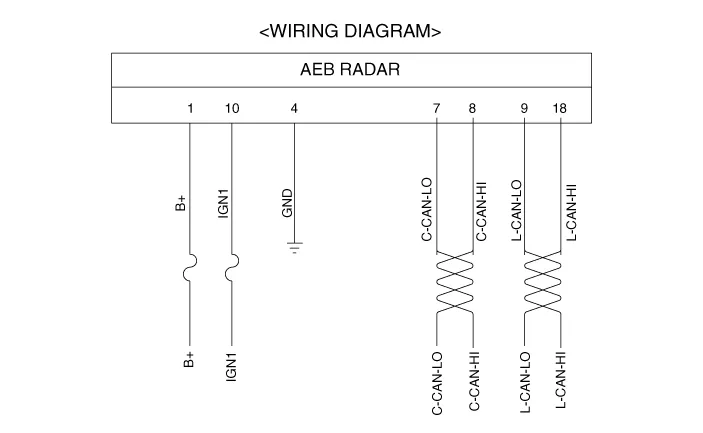
| Terminal Function |

|
No
|
Terminal function
|
| 1 | B+ |
| 2 | NC |
| 3 | NC |
| 4 | GND |
| 5 | NC |
| 6 | NC |
| 7 | C-CAN_Low |
| 8 | C-CAN_High |
| 9 | L-CAN_Low |
| 10 | IGN1 |
| 11 | NC |
| 12 | NC |
| 13 | NC |
| 14 | NC |
| 15 | NC |
| 16 | NC |
| 17 | NC |
| 18 | L-CAN_High |
ComponentsThe following is the configuration of the AEB system.– Detection device (radar and camera) that can recognize potential obstacles in the front.
InspectionAEB function ON / OFF switch was included to USM (User Setting Menu) and the state of the factory is ON.When the IGN On, maintain ON condition by default.
Other information:
Hyundai Ioniq (AE) 2017-2022 Service & Repair Manual: Components and components location
C
Hyundai Ioniq (AE) 2017-2022 Service & Repair Manual: Description and operation
DescriptionRear view monitor (RVM) will activate when the backup light is ON with the ignition switch ON and the shift lever in the R position.This system is a supplemental system that shows behind the vehicle through the AV monitor while backing-up. • This system is a supplementary function only.
Categories
- Manuals Home
- Hyundai Ioniq Owners Manual
- Hyundai Ioniq Service Manual
- Front Disc Brake. Repair procedures
- Engine Mechanical System
- Brake System
- New on site
- Most important about car

Copyright © 2026 www.hioniqae.com - 0.017