
Hyundai Ioniq (AE): Interior Features / Sunvisor
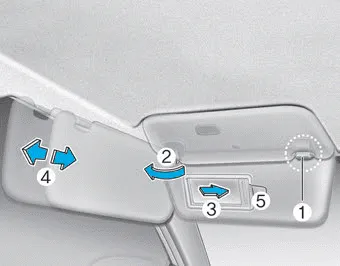
To use a sunvisor, pull it downward.
To use a sunvisor for a side window, pull it downward, unsnap it from the bracket (1) and swing it to the side (2).
To use the vanity mirror, pull down the sunvisor and slide the mirror cover (3).
Adjust the sunvisor forward or backward (4) as needed (if equipped). Use the ticket holder (5) to hold tickets (if equipped).
NOTICE
Close the vanity mirror cover securely and return the sunvisor to its original position after use.
WARNING
For your safety, do not block your view when using the sunvisor.
NOTICE
Do not put several tickets in the ticket holder at one time. This could cause damage to the ticket holder.
Cup Holder â– Front â– Rear Cups or small beverages cups may be placed in the cup holders. Rear (if equipped) Pull the armrest down to use the cup holders.
The power outlet is designed to provide power for mobile telephones or other devices designed to operate with vehicle electrical systems. The devices should draw less than 180 W (Watts) with the vehicle in the ready () mode.
Other information:
Hyundai Ioniq (AE) 2017-2022 Service & Repair Manual: Ambient Temperature Sensor. Repair procedures
Inspection1.Check the resistance of the ambient temperature sensor between terminals 1 and 2 whether it changes by changing the ambient temperature.1. Ambient Sensor (+)2. Sensor groundSpecification Ambient temperature [°C (°F)] Resistance between terminal 1 and 2 (
Hyundai Ioniq (AE) 2017-2022 Service & Repair Manual: Warning Indicator. Repair procedures
RemovalWarning Indicator1.Disconnect the negative (-) battery terminal.2.Remove the mirror (A).InstallationWarning Indicator1.Install the outside mirror.2.Connect the negative (-) battery terminal.Inspection1.Apply battery voltage to each terminal as shown in the table and verify that the mirror operates properly.
Categories
- Manuals Home
- Hyundai Ioniq Owners Manual
- Hyundai Ioniq Service Manual
- If the 12 Volt Battery is Discharged (Hybrid Vehicle)
- Repair procedures
- Front Disc Brake. Repair procedures
- New on site
- Most important about car
